# Changelog

#### 26.09  |  September 5, 2026

* No changes to the API

#### 26.08  |  August 1, 2026

* A new API, **List rejected WhatsApp contacts**, was added. It allows to identify WhatsApp contacts who are not sharing their phone number, and therefore have their messages rejected in Symphony Messaging. Calling the endpoint retrieves details for rejected message attempts, including the contact's display name and business user ID, filtered by a specified date range.

#### 26.07  |  July 4, 2026

* A new (optional) boolean, `createGroup`, was added to the request body of the **Create room** API.  &#x20;If the API is used without including this field in the request body, the system will maintain its existing behavior by default.
* The `attachmentsDisabled` boolean was updated for the API **Update a room's features**.
* The APIs **Set federation group of a room** and **Remove room member** have been updated for WhatsApp Connect (native groups).

#### 26.06  |  June 6, 2026

* The **Get the room contact details** API was added. It allows to retrieve the phone number / wa.me link used to send messages to a WhatsApp Connect contact in the 1:1 WhatsApp Connect chat created between the contact and the Symphony Messaging user (advisor) when the contact scans the QR code on the advisor's profile.

#### 26.05  |  May 2, 2025

* No changes to the API

#### 26.04  |  April 4, 2025

* No changes to the API

#### 26.03  |  March 7, 2025

* No changes to the API

#### 26.02  |  February 7, 2025

* The **Update room member's attributes** API was added to allow Symphony Messaging users to be promoted to / demoted from the room owner role. All room members are now identified as owners.

#### 26.01  |  January 10, 2025

* No changes to the API

#### 25.12  |  December 6, 2025

* No changes to the API

#### 25.11  |  November 1, 2025

* No changes to the API

#### 25.10  |  October 4, 2025

* No changes to the API

#### 25.09  |  September 6, 2025

* No changes to the API

#### 25.08  |  August 2, 2025

* No changes to the API

#### 25.07  |  July 5, 2025

* No changes to the API

#### 25.06  |  June 7, 2025

* Calling the **Get an advisor's entitlement** API after entitling a Symphony Messaging user to WhatsApp Direct with a specific phone number now sets the user’s status to `PRE-ENTITLED` if a Meta identity has not yet been created for the phone number, or `ENTITLED` if the Meta identity was already created for the Symphony Messaging user.
* For Symphony Messaging users entitled for SMS Direct and WhatsApp Direct, the **Add entitlement** customer API now includes new fields - `status` and `phone` - in the 201 response.

#### 25.05  |  May 10, 2025

* The **List entitlements** and **Get an advisor's entitlement** APIs have been updated to include users pre-entitled for WhatsApp Direct.
* The **List contact's advisors** API has been updated to return pre-entitlement information in the response.

#### 25.04  |  April 12, 2025

* The **List entitlements** API has been updated to return details for pre-entitled users for WhatsApp Direct, whereas calling the API with pre-entitled users previously returned a 404 NOT FOUND error.
* The **Bulk update advisor's federation group** API has been updated to include users who are pre-entitled for WhatsApp Direct.
* The **Pre-entitle an advisor to a phone number** and **Remove an advisor pre-entitlement** APIs have been deprecated.

#### 25.03.2  |  March 29, 2025

* The **Get an advisor's entitlement** API now returns user entitlement details, including for users who are `PRE_ENTITLED` on WhatsApp Direct. This means that a 200 status code will be returned for users who are `PRE_ENTITLED` on WhatsApp Direct, instead of the previously returned 404 code.
* The **List entitled advisors** API now returns two additional fields for entitlements: `ENTITLED` or `PRE_ENTITLED` for all external networks, and `Phone.provider` (with possible values `UMONY` or `CUSTOMER_SUPPLIED`) for SMS Direct and WhatsApp Direct.
* The **Add entitlement** API was updated to include setting Federation groups for individual users.

#### 25.03  |  March 15, 2025

* The **Add entitlement** API does not return a 409 error when a user who is already entitled to WhatsApp gets entitled to WhatsApp Direct with the same permissions.
* The **Add entitlement** API now throws a 400 error when a user is entitled with a custom number (provided by the customer and not by Symphony) and with a set of permissions specified in the request, since the management of permissions is not yet supported for such a case.

#### 25.02  |  February 15, 2025

* No changes to the API

#### 25.01  |  January 18, 2025

* Calling the **Create room** API after adding a new contact with the permission `createRoom: false` via API now creates an unique SMS Direct room and adds the contact to the room.

#### 24.12  |  December 7, 2024

* A new API endpoint, **Get advisor's phone number details**, retrieves information regarding the phone number itself and any Direct channels on which the number can be used; it shows whether the number is AVAILABLE (not yet entitled, or entitlement was removed) or ACTIVE (currently used).

#### 24.11  |  November 9, 2024

* No changes to the API

#### 24.10  |  September 30, 2024

* We added the `listPermissions` query parameter to the **List entitled advisors** API. When set to `true`, the permissions object listing Symphony Messaging users’ permissions is added to the response for each advisor. When not specified, the API answer is the same as before.
* Deleting a Symphony Messaging user’s entitlement to WhatsApp Direct via the **Remove entitlement** API also removes the user’s pre-entitlement and places the phone number allocated to the user in a `RELEASED` state.
* We added the WhatsApp Direct `empStatus` to the **Get phone number details** and **Get phone number address** API response, in order to retrieve the Meta status for WhatsApp Direct phone numbers. The API now returns a 200 response and displays the Meta status of a phone number, such as `CONNECTED`, `DISCONNECTED`, `PENDING` or `UNKNOWN`.

#### 24.09  |  September 14 2024

* A new Voice Direct permission, `enable:voice-calls`, was added to place and receive phone calls for virtual numbers.
* The following new fields have been added to the **Get phone number information API**: `assignedTo`, `externalNetworks`, `productCode`, `product`.
* v2 of the **Unblock phone numbers** API, which includes the `phoneNumbers` list in the request body instead of the query parameters, was added.

#### 24.08  |  August 17 2024

* New fields have been added to the **List an advisor's contacts** API for SMS & Voice Direct, to reflect the contact’s opted in/out status (relevant for US/Canada-based contacts): the `consent` field showing `OPTED-IN`, `OPTED-OUT` or `PENDING`, and the `status` field showing either `CONFIRMED` or `INCOMPLETE`.
* The error message returned by the **Add room member API** when no more Business API / WhatsApp phone numbers are available to create a conversation with a WhatsApp contact was updated to describe the issue more explicitly and provide instructions for solving the error.
* The **Get phone number information** API now returns a `symphony-user-not-found-problem` 400; error 404 `advisor-not-found` is no longer returned.

#### 24.07  |  July 20 2024

* SMS & Voice Direct only: A new API endpoint, **Update a phone number**, was added. It allows Symphony Messaging admins to unassign a SMS & Voice Direct phone number from a Symphony user, putting it on hold, and to reassign it to another Symphony user.
* The **Get phone number information** API response now includes the `assignedTo` attribute which contains the Symphony Messaging identifier, the first and the last name of the Symphony Messaging user to whom a phone number is assigned.

#### 24.06  |  June 22 2024

* A new object, `phoneNumberBlockedBy`, was added to the **List Contacts** API to return information related to a blocked contact, such as the ID of the Symphony Messaging user who blocked the phone number, the blocking reason, the date and the comment.

#### 24.05 |  June 1 2024

* An optional query parameter, `phoneBlocked`, was added to the **List contacts** API with three possible values: `all`, `true`, `false`. It allows filtering all, only available or only blocked contacts' phone numbers.
* A new API endpoint, **Get phone number details**, was added. This endpoint lists all the phone numbers registered for a tenant.
* A new API endpoint, **Get information on a phone number provided by Symphony**, was added. It lists phone number details and status.
* A new API, **Get contact**, has been created to retrieve the Federated contact’s status for a given Federation Group.

#### 24.04 |  May 4 2024

* The `phoneNumberBlockedBy` list of objects was added to the **List an advisor's contacts** API response, for WhatsApp Direct and SMS & Voice Direct contacts whose phone numbers have been blocked by a Symphony user. This object contains the blocking details (corresponding to any of these four attributes: `advisorSymphonyId`, `reason`, `comment`, and `requestDate`).

#### 24.03 |  April 13 2024

* The following APIs have been added: **Block phone numbers** (WhatsApp-Direct and SMS-Direct Second Number only), **Update room activity**.
* When a Symphony user blocks a contact, a new list of objects, `phoneNumberBlockedBy`, including the specific details as attributes (`advisorSymphonyId`, `reason`, `comment`, `requestDate`), is now added to the **List an advisor's contacts** endpoint.
* New error responses have been added to the **Add entitlement** API.

#### 24.02 |  23 March 2024

* New error messages were added to the **Add entitlement** API.
* A new attribute, `isColleague`, was added to the **List contact** API response.
* A new field, `moveToDefault`, was added to the **Set federation group of a room** API response.

#### 24.01 | 20 January 2024

* The **Remove permission** API was implemented for WhatsApp-Direct.
* Error 403 was added to the **Add a contact and/or advisors to a contact** API for SMS-Direct.
* The `advisorSymphonyId` query parameter was added to the **List contacts** API.

#### 23.11 | 25 November 2023

* The **Remove an advisor pre-entitlement** API was added for WhatsApp-Direct.
* The description of the API **Pre-entitle an advisor to a phone number** for WhatsApp-Direct was updated.

#### 23.10 | 14 October 2023

* The following APIs have been updated to include WhatsApp-Direct: **Pre-entitle an advisor to a phone number**, **List permissions**, **List advisor's permissions**.
* The **List EMP permissions** API was added for SMS-Direct.

#### 23.09 | 16 September 2023

* The following APIs have been updated to include WhatsApp-Direct: **Add a contact and/or advisors to a contact**, **List or search for contacts**, **List an advisor's contacts**.

#### 23.08 | 9 August 2023

* For SMS-Direct, new status codes have been added to phone numbers to distinguish pre-allocated phone numbers; the logic for provisioning/assigning phone numbers was updated to prevent random allocation of phone numbers that have been identified as pre-allocated.

#### 23.07 | 29 Jul 2023

* The following APIs have been added: **Get phone number info**, **Get phone number address**, **Update phone number address** and **Remove phone number address**.
* For LINE, `empChannelConnector` is not required when LINE channel automatic selection is enabled at the company or federation group level.
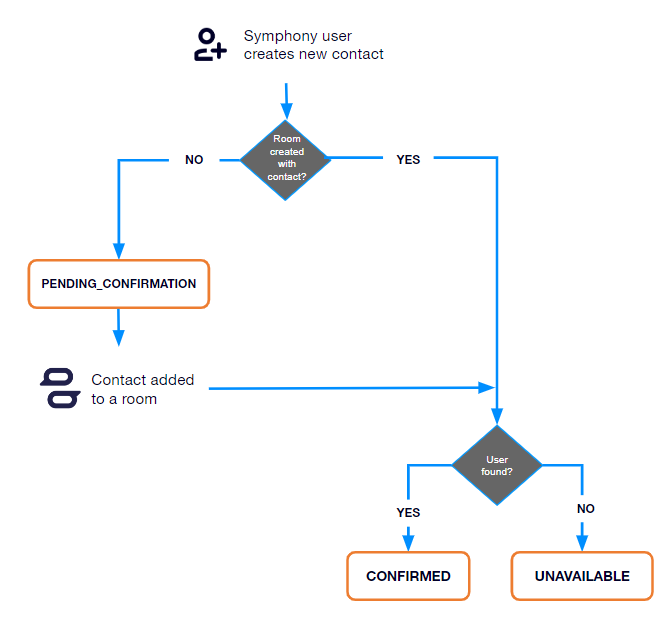
* The PENDING CONFIRMATION, UNAVAILABLE and CONFIRMED contact statuses were added to the WhatsApp API response. See the **Contact status** page for more information.
* The `enable:voice-calls` permission was added for SMS-Direct. It is required to make and receive phone calls from and to virtual numbers. See the **Permissions** table for more information.

#### 23.06 | 24 Jun 2023

* The `subNetwork` parameter is now mandatory in the **Add entitlement** API for SMS-DIRECT.
* Two new error responses have been added to the **Add entitlement** flow for SMS-DIRECT: `wrong-subnetwork-for-phone-number` (returned if the wrong subnetwork is selected for a phone number) and `subnetwork-is-required` (returned if no network is selected for a phone number).

#### 23.05 | 3 Jun 2023

* No changes to the API

#### 23.04 | 29 Apr 2023

* For SMS, LINE, WHATSAPP and WECHAT, the `companyName` and `emailAddress` parameters are mandatory. For SMS-DIRECT only, `companyName` and `emailAddress` are **not** mandatory.
* The definition of the **Resend a new invitation API** was updated to include information about resetting the LINE one-time-password.
* Only for the LINE external network, the `emp-channel-connector` is returned in the **Add room member** and **List room members** responses.

#### 23.03 | 1 Apr 2023

* The **List EMP connectors available for one or multiple contacts** API endpoint was added.
* The **Copy contact** API endpoint was added.

#### 23.02 | 25 Feb 2023

* The `edit:contact-email` permission was added. It allows users to edit a contact email via the **Contacts** tab or the **Admin** tab. See the **Permissions** table for more information.
* The definition of the `edit:contact` permission was updated to include the possibility to edit the contact's email address if the user has the `edit:contact-email` permission.


# Federation public API

API for Symphony Federation Services (SFS) MicroService (MS) Admin

This API provides endpoints that manage different aspects of the WECHAT, WHATSAPP, SMS, SMS-DIRECT, LINE federated services, further referred to as "external networks".

## **Federation Swagger file**

{% file src="/files/LCXEISp6Af2pYCIb2dl7" %}


# Getting started

{% hint style="warning" %}
Always use the ![](https://1772193191-files.gitbook.io/~/files/v0/b/gitbook-x-prod.appspot.com/o/spaces%2FyzYyBwz8lpdHwbqafgtF%2Fuploads%2Fgit-blob-5e19c5997155d481f1b77468c881d6928be37d95%2FAPI_copy_example.png?alt=media) **Copy** icon in the example field when copying examples. Manual copy and paste is known to cause data format errors.
{% endhint %}

## Domain name

{% hint style="info" %}
For all the APIs, CONNECT-DOMAIN refers to the domain name for the WECHAT or WHATSAPP or SMS or SMS-DIRECT or LINE platforms.
{% endhint %}

* Production CONNECT-DOMAIN: `https://connect.symphony.com/admin`
* Test CONNECT-DOMAIN: `https://connect.uat.symphony.com/admin`

#### **Example: Request to get the list of available entitlements**

```bash
curl -X GET "https://connect.symphony.com/admin/api/v2/customer/entitlements"
```

{% hint style="info" %}
**Note:** Headers have been omitted in this example.
{% endhint %}

## Multi-company contacts

For Multi-company-contacts, the contacts must be from the same network, for example, all from WeChat or all from WhatsApp. Cross-network rooms are not authorized.


# WhatsApp onboarding flow

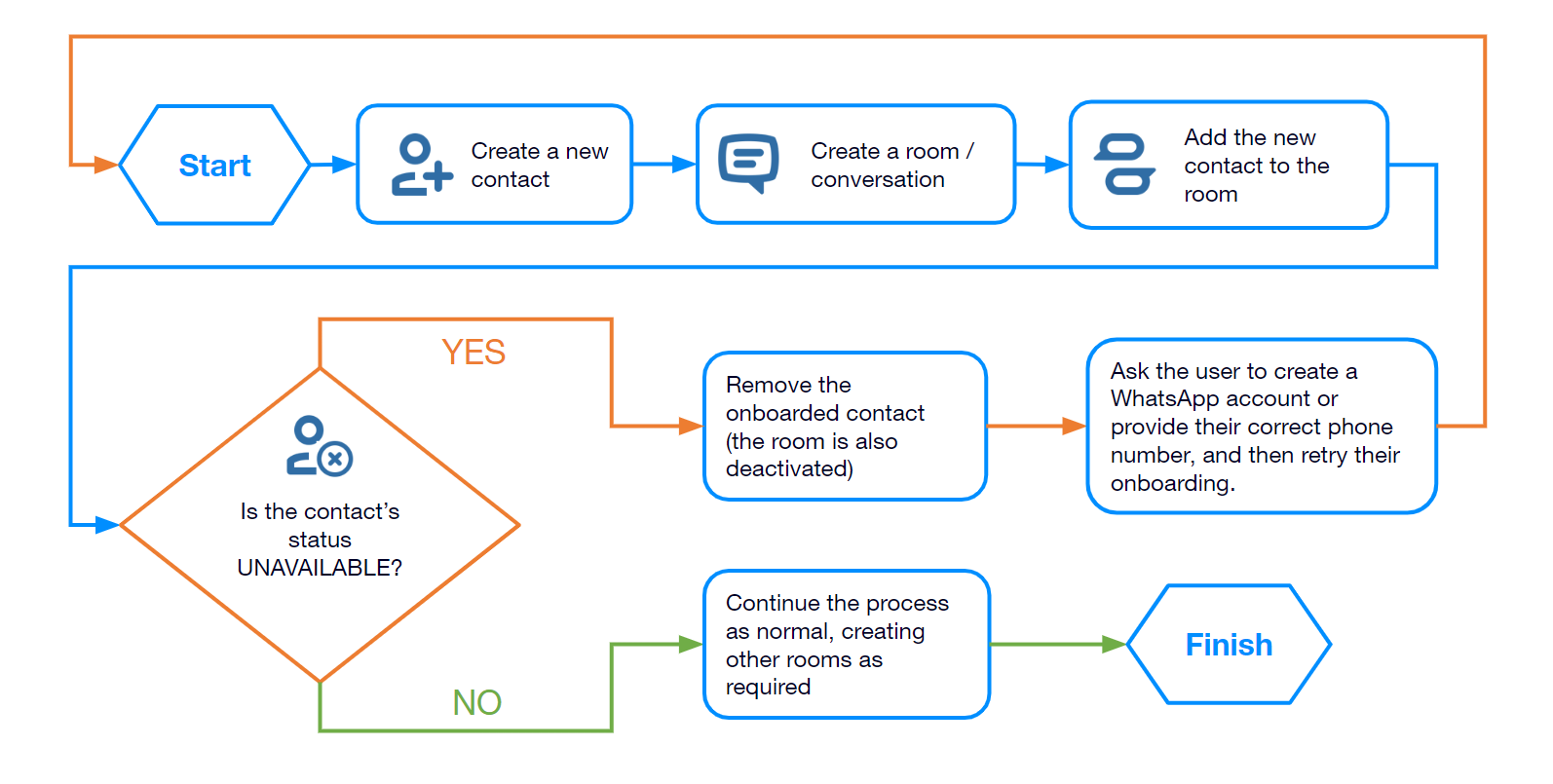
**1.** Create a new WhatsApp contact (use the [Add a contact and/or advisors to a contact](/readme/contact#add-a-contact-and-or-advisors-to-a-contact) API).

**2.** Create a room (use the [Create room](/readme/room#create-room) API).

**3.** Add the new contact to the room (use the [Add room member ](/readme/room#add-room-member)API).

**4.** Symphony Connect Helper sends the welcome message template to the new contact.

**5.** Check whether:

* The message *"We couldn’t add to this room as their WhatsApp account was not found"* is sent in the room.\
  OR
* In the WhatsApp Connect app, the contact’s card shows the status *UNAVAILABLE* (if using a bot, check for `"status": "UNAVAILABLE"` in the API response).

**6.** If the contact’s status is *UNAVAILABLE*:

* The contact does not have the WhatsApp app, and you should remove them.

{% hint style="info" %}
If they're the last contact in the room, this will deactivate the room.
{% endhint %}

* Ask the user to create a WhatsApp account or provide their correct phone number and retry the onboarding.

**7.** If the contact’s status is **different from** *UNAVAILABLE* (see the [Contact status](/readme/contact/contact-status) section):

* The contact has the WhatsApp app, and you can continue the flow as usual.

{% hint style="warning" %}
No status will be returned if the contact is created without being added to a room.
{% endhint %}

<figure><img src="https://1772193191-files.gitbook.io/~/files/v0/b/gitbook-x-prod.appspot.com/o/spaces%2FyzYyBwz8lpdHwbqafgtF%2Fuploads%2Fgit-blob-a12c3c58eae154ac833102b395ca76639c6e02cb%2FWhatsApp_onboarding_flow.png?alt=media" alt=""><figcaption></figcaption></figure>


# SMS & Voice Direct onboarding flow

**Manual onboarding**

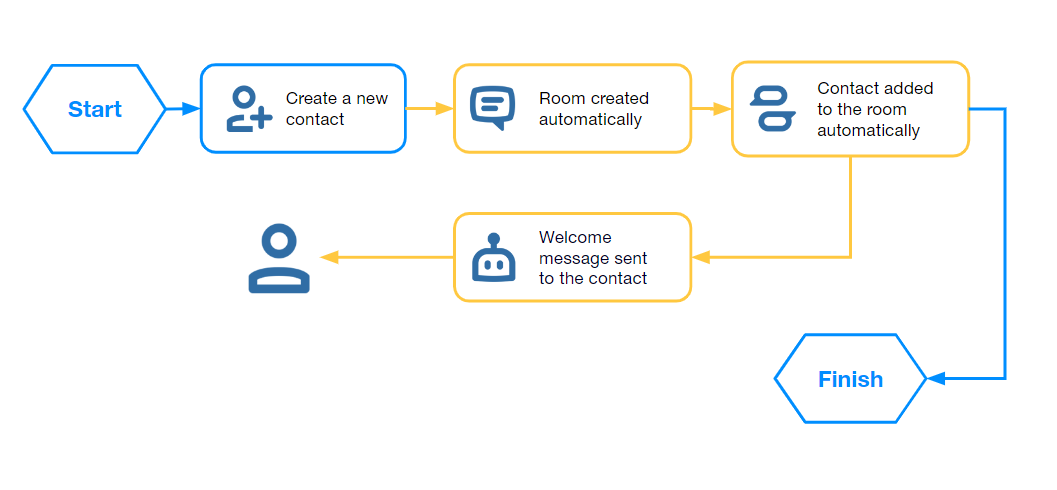
**1.** Create a new SMS-DIRECT contact (use the [Add a contact and/or advisors to a contact](/readme/contact#add-a-contact-and-or-advisors-to-a-contact) API).

**2.** Symphony Connect Helper creates a room with the contact.

**3.** Symphony Connect Helper sends the welcome message template to the new contact.

**4.** The contact has an SMS conversation on their phone. You can continue the flow as usual.

{% hint style="info" %}
Symphony users sending a SMS message to a US-based contact for the first time will trigger an opt in/opt out step, in line with the requirements laid out in the Telephone Consumer Protection Act of 1991 (“TCPA”). The contact cannot receive the first message sent by the Symphony user until they explicitly opt in to communicate via the channel.
{% endhint %}

<figure><img src="https://1772193191-files.gitbook.io/~/files/v0/b/gitbook-x-prod.appspot.com/o/spaces%2FyzYyBwz8lpdHwbqafgtF%2Fuploads%2Fgit-blob-3e7885afbcb392a5e088cccb789dc7af3a0cc6c5%2FManual%20SMS%20%26%20Voice%20Direct%20onboarding.png?alt=media" alt=""><figcaption><p><em>Manual SMS &#x26; Voice Direct onboarding</em></p></figcaption></figure>

**'On-the-fly' onboarding (inbound message)**

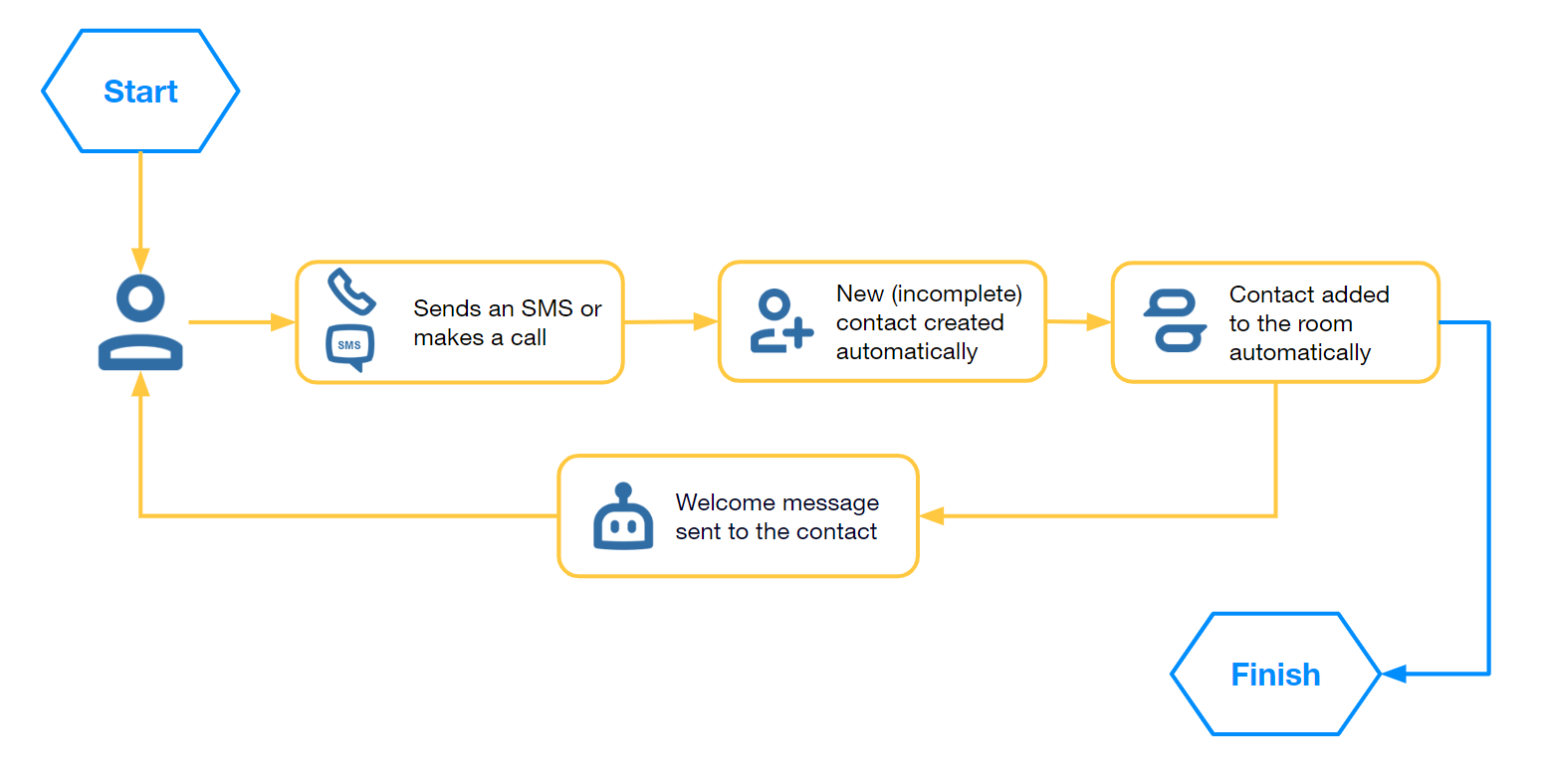
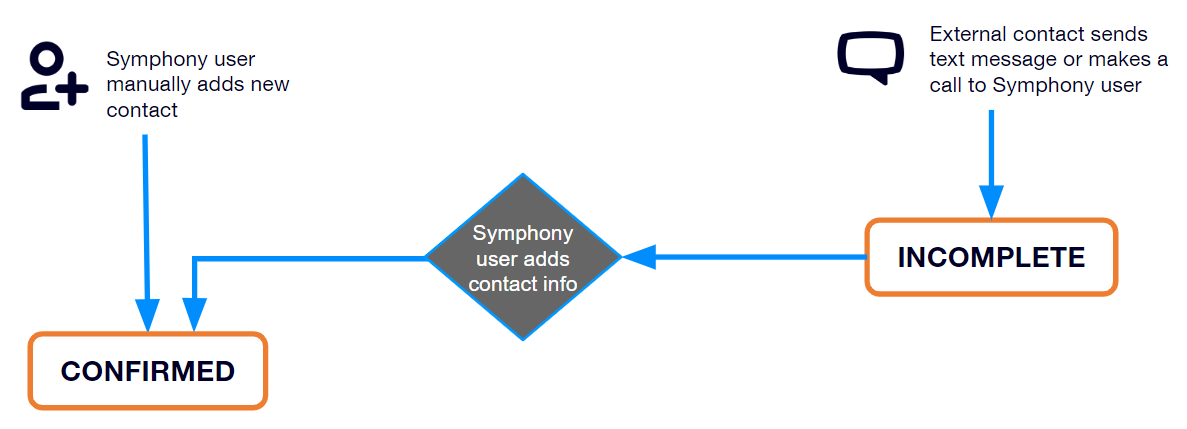
**1.** A Symphony user receives an unsolicited SMS or phone call from a phone number (an SMS-DIRECT number) that is not associated with any existing contact in their list.

**2.** A new incomplete contact is created ‘on-the-fly’ in the contact list.

In the SMS & Voice Direct extension app (Symphony Desktop), the contact’s card shows an *INCOMPLETE* status and only displays the phone number. The contact's name and details can be edited afterwards.

**3.** Symphony Connect Helper creates a room with the contact.

**4.** Symphony Connect Helper sends a welcome message to the contact. You can continue the flow as usual.

<figure><img src="https://1772193191-files.gitbook.io/~/files/v0/b/gitbook-x-prod.appspot.com/o/spaces%2FyzYyBwz8lpdHwbqafgtF%2Fuploads%2Fgit-blob-b3b75ccb06b5452e71aeb8519b34b6c41a99ff96%2FOn-the-fly%20SMS%20%26%20Voice%20Direct%20onboarding.png?alt=media" alt=""><figcaption><p><em>On-the-fly SMS &#x26; Voice Direct onboarding</em></p></figcaption></figure>


# LINE onboarding flow

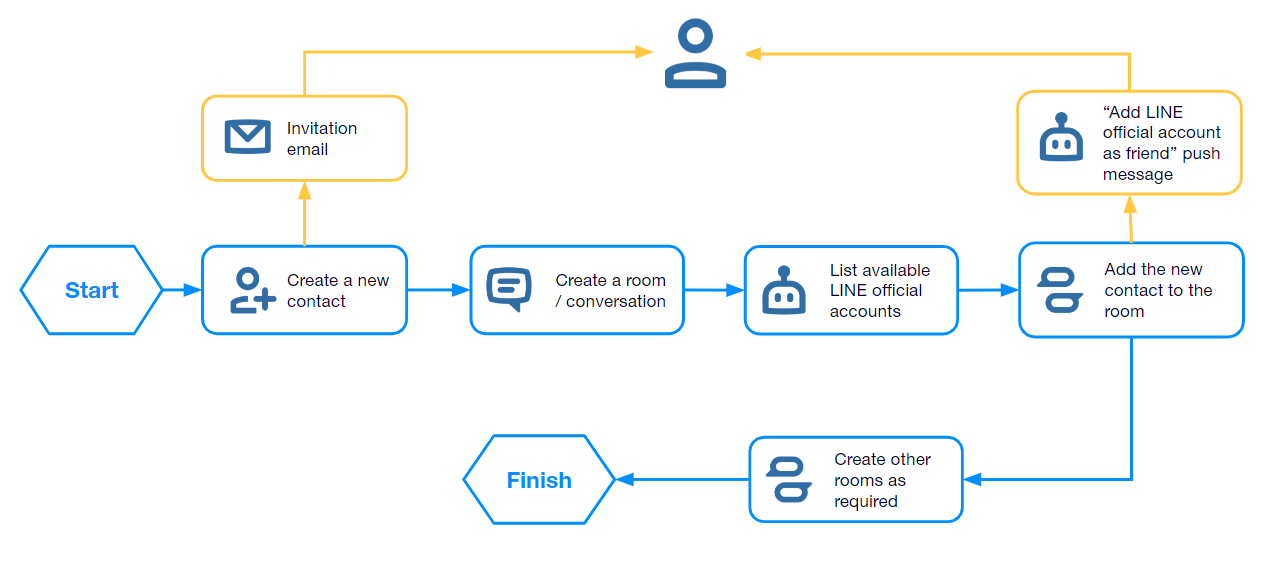
**1.** Create a new LINE contact (use the [Add a contact and/or advisors to a contact](/readme/contact#add-a-contact-and-or-advisors-to-a-contact) API).

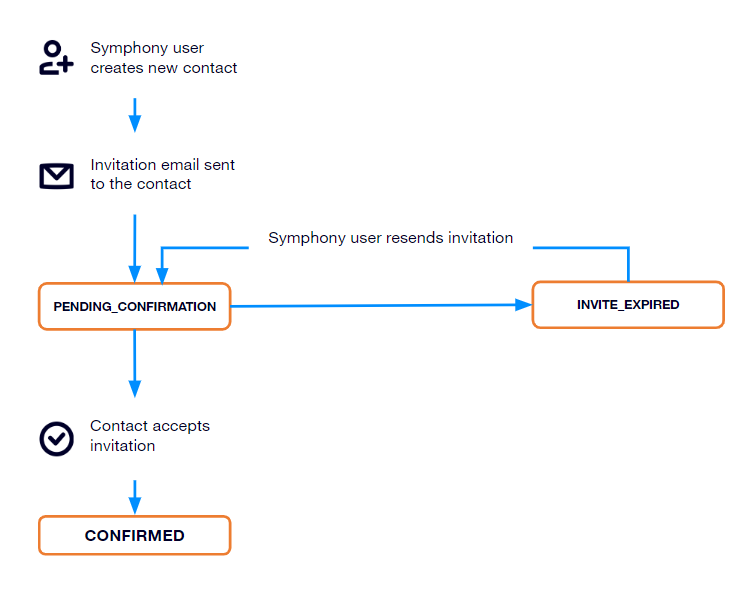
* If the contact is onboarded for the first time, they will receive an invitation email with complete instructions on how to authenticate their identity via the LINE app.
* Check if the user has completed their onboarding:
  * In the LINE Connect app: Check if the contact’s card shows the status *CONFIRMED*.
  * Using the [List or search for contact](/readme/search#list-or-search-for-contacts) API: Look for `"status": "CONFIRMED"` in the API response.

**2.** Create a room (use the [Create room](/readme/room#create-room) API).

**3.** Get the available LINE channels (also known as *LINE Official Accounts*) that can be used to communicate with the contact in the room (use [List available channel connectors](/readme/tenant#list-emp-connector-available-for-one-or-multiple-contacts) API). This is not required if the LINE channel automatic selection is enabled for your company of federation group.

**4.** Add the new contact to the room, specifying one available LINE channel (*LINE Official Account*) ID (use the [Add room member](/readme/room#add-room-member) API). To trigger automatic LINE channel selection (if enabled for your company or federation group), keep the LINE channel field empty.

The contact will receive a push message, inviting them to add the automatically or manually selected LINE official account as a friend in the LINE app.

<figure><img src="https://1772193191-files.gitbook.io/~/files/v0/b/gitbook-x-prod.appspot.com/o/spaces%2FyzYyBwz8lpdHwbqafgtF%2Fuploads%2Fgit-blob-ee92e1508342d5f4f463dd1438f626faae31f369%2FLINE%20onboarding%20flow.png?alt=media" alt=""><figcaption></figcaption></figure>


# Authentication

{% hint style="warning" %}
Always use the ![](https://1772193191-files.gitbook.io/~/files/v0/b/gitbook-x-prod.appspot.com/o/spaces%2FyzYyBwz8lpdHwbqafgtF%2Fuploads%2Fgit-blob-5e19c5997155d481f1b77468c881d6928be37d95%2FAPI_copy_example.png?alt=media) **Copy** icon in the example field when copying examples. Manual copy and paste is known to cause data format errors.
{% endhint %}

### **RSA public key registration**

Prior to any calls, a customer needs to provide \*\*\*\* at least **one pem-encoded public key**, associated with a **name** that will identify this key on the Connect platform (WECHAT, WHATSAPP, SMS, SMS-DIRECT or LINE). These two pieces of information will enable the customer to generate a Java Web Token (JWT) required with all calls to the Connect platform API endpoints.

For more information on this authentication mechanism and the key pair format, please refer to the [RSA Authentication Workflow documentation.](https://docs.developers.symphony.com/building-bots-on-symphony/authentication/rsa-authentication#1-create-an-rsa-key-pairr)

For convenience, we provide below the sequence to create a RSA key pair:

```shell
cert_prefix="my-rsa-pair"
openssl genrsa -out "${cert_prefix}_privatekey.pem" 4096
openssl req -newkey rsa:$bitlength -x509 -key "${cert_prefix}_privatekey.pem" -out "${cert_prefix}_publickey.cer"
openssl pkcs8 -topk8 -nocrypt -in "${cert_prefix}_privatekey.pem" -out "${cert_prefix}_privatekey.pkcs8"
openssl x509 -pubkey -noout -in "${cert_prefix}_publickey.cer"  > "${cert_prefix}_publickey.pem"
```

For security reasons, the private key MUST NOT be shared. Symphony employees will not be asking for the private key.

Should you need to revoke the key or in case you have lost it, you can request its removal or replacement by opening a ticket with Symphony support.

### API calls authentication

The JWT must be provided by the caller as a **Bearer Token** in the **Authorization** header of each HTTP request (see <https://swagger.io/docs/specification/authentication/bearer-authentication>).

```yaml
Authorization: Bearer <jwt token>
```

The Connect platform requires the JWT token to include this specific information:

```
  | ------------------| -------------- | ------------|
  | Subject           | sub            | The subject must follow format ces:customer:public_key_name where public_key_name is the name of the public key registered in Connect platform system|
  | Issued At         | iat            | The creation date of the token, following the RFC7519 format|
  | Expiration date   | exp            | The expiration date of the token, following the RFC7519 format. This must be at most equal to iat + 30 minutes.|
  | JWT ID            | jti            | A unique ID for your JWT (e.g., a random UUID)|

```

**Example: Java using \_io.jsonwebtoken:jjwt**\_\*\* library\*\* **(**[**https://github.com/jwtk/jjwt**](https://github.com/jwtk/jjwt)**, connect to preview)**

**Note:** This library is a dependency of the Symphony SDK, meaning that, if you are set up to work with Symphony APIs, you do not require any additional library.

```java
public static String generate(PrivateKey privateKey, String publicKeyName) {
  return Jwts.builder()
    .setSubject("ces:customer:" + publicKeyName)
    .setId(UUID.randomUUID().toString())
    .setIssuedAt(Date.from(now.toInstant()))
    .setExpiration(Date.from(now.plusMinutes(30).toInstant()))
    .signWith(SignatureAlgorithm.RS512, privateKey)
    .compact();
}
```

**Example: API call using Curl**

```bash
curl --location --request GET 'https://connect.dev.symphony.com/admin/api/v1/customer/permissions' \
                --header 'Authorization: Bearer eyJhbGciOiJSU....42sMd9soxkrnn7et44OM'
```


# Permissions

Available permissions as of release 24.10

<table data-full-width="false"><thead><tr><th width="220">PERMISSION</th><th width="207">AVAILABILITY</th><th>DESCRIPTION</th></tr></thead><tbody><tr><td>create:room</td><td><ul><li>WeChat</li><li>WhatsApp</li><li>SMS</li><li>SMS-Direct</li><li>LINE</li></ul></td><td>Required to create a room. It also allows the user to use the <strong>Rooms</strong> tab to manage rooms: create a room, deactivate a room, add members, remove members, transfer room ownership. If the user doesn’t have the <code>create:room</code> permission, the <strong>New room</strong> button is not displayed. (All users have access to the <strong>Rooms</strong> tab, even if they do not have the <code>create:room</code> permission.)</td></tr><tr><td>create:contact</td><td><ul><li>WeChat</li><li>WhatsApp</li><li>SMS</li><li>SMS-Direct</li><li>LINE</li></ul></td><td>Required to create a contact via the <strong>Contacts</strong> tab. If the user doesn’t have the <code>create:contact</code> permission, the <strong>New contact</strong> button is not displayed on the <strong>Contacts</strong> tab. (All users have access to the <strong>Contacts</strong> tab, even if they do not have the <code>create:contact</code> permission.)<br>Users without the <code>create:contact</code> permission will have contacts created each time they are added to rooms with new contacts. Also required (along with <code>admin:list-customers</code> and <code>on-behalf:onboard</code>) to add new advisor connections to a client from the <strong>Admin</strong> tab.</td></tr><tr><td>on-behalf:onboard</td><td><ul><li>WeChat</li><li>WhatsApp</li><li>SMS</li><li>SMS-Direct</li><li>LINE</li></ul></td><td>Enables the user to onboard contacts on behalf of other users. Also required (along with <code>admin:list-customers</code>) to add a connection to a contact via the <strong>Admin</strong> tab.</td></tr><tr><td>edit:contact</td><td><ul><li>WeChat</li><li>WhatsApp</li><li>SMS</li><li>SMS-Direct</li><li>LINE</li></ul></td><td>Required to edit a contact via the <strong>Contacts</strong> tab. If the user doesn’t have the <code>edit:contact</code> permission, the <strong>Edit contact</strong> option is not displayed in the <strong>Contacts</strong> tab. A contact’s first and last name cannot be edited if the contact has already been added to WhatsApp Connect by another user. The company name cannot be edited if the contact is already a participant in a chat room. The email address and telephone number cannot be edited. Also required (along with <code>admin:list-customers</code> and on-behalf:onboard) to edit client contact details from the <strong>Admin</strong> tab.</td></tr><tr><td>edit:contact-email</td><td><ul><li>WeChat</li><li>WhatsApp</li><li>SMS</li><li>SMS-Direct</li><li>LINE</li></ul></td><td>Required to edit a contact email via the <strong>Contacts</strong> tab or the <strong>Admin</strong> tab. If the user doesn’t have the <code>edit:contact-email</code> permission, the email address field of the <strong>Edit contact</strong> form is disabled in the <strong>Contacts</strong> tab, and so the email cannot be modified. An email address cannot be modified to the same value of another contact email address already existing in the contacts list.</td></tr><tr><td>delete:contact</td><td><ul><li>WeChat</li><li>WhatsApp</li><li>SMS</li><li>SMS-Direct</li><li>LINE</li></ul></td><td>Required to delete a contact via the <strong>Contacts</strong> tab. If the user doesn’t have the <code>delete:contact</code> permission, the <strong>Remove contact</strong> option is not displayed in the <strong>Contacts</strong> tab. This permission is not required to delete a contact in the <strong>Admin</strong> tab.</td></tr><tr><td>on-behalf:simple-offboard</td><td><ul><li>WeChat</li><li>WhatsApp</li><li>SMS</li><li>SMS-Direct</li><li>LINE</li></ul></td><td>Required to offboard a contact or to remove a connection from a user via the <strong>Admin</strong> tab (along with <code>admin:list-customers</code>). This permission is <strong>not</strong> required to remove a contact via the <strong>Contacts</strong> tab.</td></tr><tr><td>admin:list-customers</td><td><ul><li>WeChat</li><li>WhatsApp</li><li>SMS</li><li>SMS-Direct</li><li>LINE</li></ul></td><td><p>Gives the user access to the <strong>Admin</strong> tab, which displays all contacts onboarded for the current tenant and allows the user to add a contact to an existing room, view rooms a contact is part of, and view a given contact’s advisor connections. Additional permissions required for additional functionalities on the <strong>Admin</strong> tab:</p><ul><li>To offboard a contact or remove a connection from an advisor via the <strong>Admin</strong> tab, the user requires the <code>on-behalf:simple-offboard</code> permission in addition to the <code>admin:list-customers</code>.</li><li>To create new contacts on behalf of advisors from the <strong>Admin</strong> tab, the user requires both the <code>create:contact</code> and the <strong>on-behalf:onboard</strong> permissions.</li><li>To edit contact details, the user requires both the <code>edit:contact</code> and <code>on-behalf:onboard</code> permissions.</li></ul></td></tr><tr><td>add:multi-company-contact</td><td><ul><li>WeChat</li><li>WhatsApp</li><li>SMS</li><li>SMS-Direct</li><li>LINE</li></ul></td><td>Allows the user to participate in a room with contacts from different companies. Requires the <code>create:room</code> permission.</td></tr><tr><td>create:own-external-contact</td><td><ul><li>WhatsApp</li></ul></td><td>Allows the user to configure and activate their own WhatsApp account, and add it to rooms.</td></tr><tr><td>create:colleague-contacts</td><td><ul><li>WhatsApp</li></ul></td><td>Allows the user to create the WhatsApp contact of someone in the same company, based on their WhatsApp profile.</td></tr><tr><td>enable:voice-calls</td><td><ul><li>SMS-Direct</li></ul></td><td><p>Required to place and receive phone calls for virtual numbers. If a user does not have this permission, the call button is not displayed in SMS-Direct rooms.</p><p>This permission does not affect business numbers, and no call button will be displayed in Symphony for such numbers, as business number calls can be placed and received only though the phone's native devices.</p></td></tr><tr><td>enable:call-recording</td><td><ul><li>WhatsApp</li></ul></td><td>Required to record phone calls for WhatsApp. If a user has this permission, the call is automatically recorded. This permission is only visible if voice recording has been enabled for the tenant.</td></tr></tbody></table>

{% hint style="info" %}
By default, when an Advisor is entitled, they are assigned the following permissions: `create:room`, `create:contact`, `edit:contact`, `delete:contact`, `on-behalf:onboard`. These default permissions are configurable.
{% endhint %}

***


# Contact API

{% hint style="warning" %}
Always use the ![](https://1772193191-files.gitbook.io/~/files/v0/b/gitbook-x-prod.appspot.com/o/spaces%2FyzYyBwz8lpdHwbqafgtF%2Fuploads%2Fgit-blob-5e19c5997155d481f1b77468c881d6928be37d95%2FAPI_copy_example.png?alt=media) **Copy** icon in the example field when copying examples. Manual copy and paste is known to cause data format errors.
{% endhint %}

### Add a contact and/or advisors to a contact

{% openapi src="/files/LCXEISp6Af2pYCIb2dl7" path="/api/v2/customer/contacts" method="post" %}
[api.yaml](https://1772193191-files.gitbook.io/~/files/v0/b/gitbook-x-prod.appspot.com/o/spaces%2FyzYyBwz8lpdHwbqafgtF%2Fuploads%2Fgit-blob-4cf3731dbfb2fe66fece9763e2ac103bda188233%2Fapi.yaml?alt=media)
{% endopenapi %}

### Copy contact

{% openapi src="/files/LCXEISp6Af2pYCIb2dl7" path="/api/v1/customer/contacts/{contactSymphonyId}/copy" method="post" %}
[api.yaml](https://1772193191-files.gitbook.io/~/files/v0/b/gitbook-x-prod.appspot.com/o/spaces%2FyzYyBwz8lpdHwbqafgtF%2Fuploads%2Fgit-blob-4cf3731dbfb2fe66fece9763e2ac103bda188233%2Fapi.yaml?alt=media)
{% endopenapi %}

### Update contact

{% openapi src="/files/LCXEISp6Af2pYCIb2dl7" path="/api/v2/customer/contacts/{contactSymphonyId}" method="put" %}
[api.yaml](https://1772193191-files.gitbook.io/~/files/v0/b/gitbook-x-prod.appspot.com/o/spaces%2FyzYyBwz8lpdHwbqafgtF%2Fuploads%2Fgit-blob-4cf3731dbfb2fe66fece9763e2ac103bda188233%2Fapi.yaml?alt=media)
{% endopenapi %}

### Resend a new invitation

{% openapi src="/files/LCXEISp6Af2pYCIb2dl7" path="/api/v1/customer/contacts/{contactSymphonyId}/advisor/{advisorSymphonyId}/resendInvite" method="post" %}
[api.yaml](https://1772193191-files.gitbook.io/~/files/v0/b/gitbook-x-prod.appspot.com/o/spaces%2FyzYyBwz8lpdHwbqafgtF%2Fuploads%2Fgit-blob-4cf3731dbfb2fe66fece9763e2ac103bda188233%2Fapi.yaml?alt=media)
{% endopenapi %}

### Remove contact

{% openapi src="/files/LCXEISp6Af2pYCIb2dl7" path="/api/v2/customer/contacts/{contactSymphonyId}/advisor/{advisorSymphonyId}" method="delete" %}
[api.yaml](https://1772193191-files.gitbook.io/~/files/v0/b/gitbook-x-prod.appspot.com/o/spaces%2FyzYyBwz8lpdHwbqafgtF%2Fuploads%2Fgit-blob-4cf3731dbfb2fe66fece9763e2ac103bda188233%2Fapi.yaml?alt=media)
{% endopenapi %}

### Remove all contacts

{% openapi src="/files/LCXEISp6Af2pYCIb2dl7" path="/api/v2/customer/contacts/advisor/{advisorSymphonyId}" method="delete" %}
[api.yaml](https://1772193191-files.gitbook.io/~/files/v0/b/gitbook-x-prod.appspot.com/o/spaces%2FyzYyBwz8lpdHwbqafgtF%2Fuploads%2Fgit-blob-4cf3731dbfb2fe66fece9763e2ac103bda188233%2Fapi.yaml?alt=media)
{% endopenapi %}

### Remove the contact from all advisors they are connected to for a given external network

{% openapi src="/files/LCXEISp6Af2pYCIb2dl7" path="/api/v2/customer/contacts/{contactSymphonyId}" method="delete" %}
[api.yaml](https://1772193191-files.gitbook.io/~/files/v0/b/gitbook-x-prod.appspot.com/o/spaces%2FyzYyBwz8lpdHwbqafgtF%2Fuploads%2Fgit-blob-4cf3731dbfb2fe66fece9763e2ac103bda188233%2Fapi.yaml?alt=media)
{% endopenapi %}

### Bulk remove advisor-contact connections

{% openapi src="/files/LCXEISp6Af2pYCIb2dl7" path="/api/v2/customer/contacts/removal" method="post" %}
[api.yaml](https://1772193191-files.gitbook.io/~/files/v0/b/gitbook-x-prod.appspot.com/o/spaces%2FyzYyBwz8lpdHwbqafgtF%2Fuploads%2Fgit-blob-4cf3731dbfb2fe66fece9763e2ac103bda188233%2Fapi.yaml?alt=media)
{% endopenapi %}


# Contact status

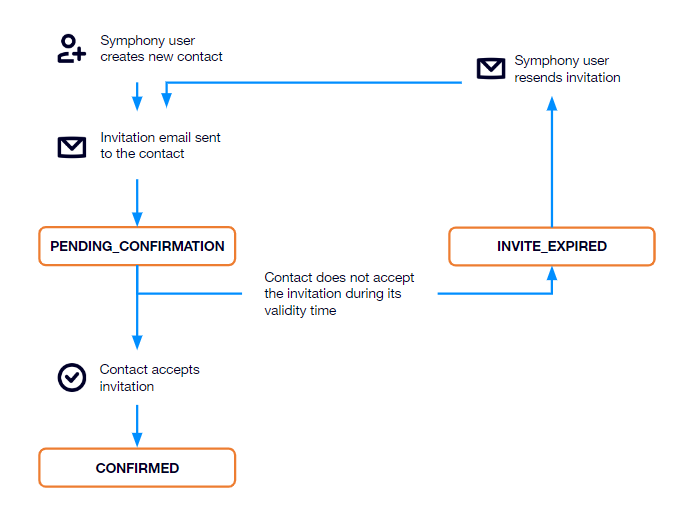
The contact status provides information on a user’s onboarding status. The value of the status can vary and depends of the external network on which the user is onboarded.

**Note:** Contact statuses are only used for LINE, WeChat, SMS & Voice Direct and WhatsApp contacts.

Available contact statuses are:

<table><thead><tr><th width="178.33333333333331">Contact status</th><th width="148">Availability</th><th>Description</th></tr></thead><tbody><tr><td><strong>PENDING_CONFIRMATION</strong></td><td><ul><li>WhatsApp</li><li>WeChat</li><li>LINE</li></ul></td><td>The invitation email was sent, but the contact did not validate their onboarding yet.</td></tr><tr><td><strong>CONFIRMED</strong></td><td><ul><li>LINE</li><li>WhatsApp</li><li>SMS-Direct</li></ul></td><td><p>The invitation email was sent and the contact used it to validate their onboarding.</p><ul><li>WhatsApp: The contact was successfully added to a room.</li></ul></td></tr><tr><td><strong>INVITE_EXPIRED</strong></td><td><ul><li>WeChat</li><li>LINE</li></ul></td><td>The invitation email was sent, but the delay for the contact to validate their onboarding through the invitation was exceeded.</td></tr><tr><td><strong>UNAVAILABLE</strong></td><td><ul><li>WhatsApp</li></ul></td><td><p>The contact's phone number is not valid for the external network.</p><p><strong>Note:</strong> For WhatsApp, the contact status is either empty or <em>UNAVAILABLE</em>. The <em>UNAVAILABLE</em> status will only appear if the WhatsApp contact has already been added to a room, as we need to send the welcome template at least once to check if the contact’s phone number is valid. Once the contact’s status is set to <em>UNAVAILABLE</em>, the only way to change this state is by removing and creating the contact again.</p></td></tr><tr><td><strong>INCOMPLETE</strong></td><td><ul><li>SMS-Direct</li><li>WhatsApp-Direct</li></ul></td><td>A contact who is not in a Symphony user's contact list is automatically onboarded after sending a message or making a call to the Symphony user's second (or virtual) number.</td></tr><tr><td><strong>BLOCKED</strong></td><td><ul><li>SMS-Direct</li><li>WhatsApp-Direct</li></ul></td><td>A contact who cannot be automatically onboarded; a Symphony user needs to onboard or unblock them.</td></tr></tbody></table>

#### WhatsApp contact status

<div align="left"><figure><img src="https://1772193191-files.gitbook.io/~/files/v0/b/gitbook-x-prod.appspot.com/o/spaces%2FyzYyBwz8lpdHwbqafgtF%2Fuploads%2Fgit-blob-4041934c3a17ac4afa01a62ad3bdf79ccc620d2c%2FContact_status_WhatsApp.png?alt=media" alt="" width="503"><figcaption></figcaption></figure></div>

#### WeChat contact status

<div align="left"><figure><img src="https://1772193191-files.gitbook.io/~/files/v0/b/gitbook-x-prod.appspot.com/o/spaces%2FyzYyBwz8lpdHwbqafgtF%2Fuploads%2Fgit-blob-236ada87097ac839fbe822a8f4f67f8bc2e6d466%2FContact_status_WeChat.png?alt=media" alt="" width="563"><figcaption></figcaption></figure></div>

#### LINE Contact Status

<div align="left"><figure><img src="https://1772193191-files.gitbook.io/~/files/v0/b/gitbook-x-prod.appspot.com/o/spaces%2FyzYyBwz8lpdHwbqafgtF%2Fuploads%2Fgit-blob-bada3aa3b8f5c41f8b9334e0465922fcacf05925%2FContact_status_LINE.png?alt=media" alt="" width="520"><figcaption></figcaption></figure></div>

#### SMS & Voice Direct Contact Status

<div align="left"><figure><img src="https://1772193191-files.gitbook.io/~/files/v0/b/gitbook-x-prod.appspot.com/o/spaces%2FyzYyBwz8lpdHwbqafgtF%2Fuploads%2Fgit-blob-0640f44b9b2035abda96416e2b69799a14f66010%2FContact_status_SMS_Voice_Direct.png?alt=media" alt="" width="563"><figcaption></figcaption></figure></div>


# WhatsApp contact preferred language

Once enabled for an external network, the contact preferred language can be set and updated for users through the customer endpoint dedicated to contact management.

The list of supported preferred languages is based on Meta's Supported Languages list, available at <https://developers.facebook.com/docs/whatsapp/api/messages/message-templates/#supported-languages->.

In this list, each valid language name is associated with a language code. The convention we use for setting the contact preferred language is full language names from the list, for example, French, German, Japanese, etc. Language name options including a code between parentheses are written with an underscore instead of parentheses, for example, English\_UK, Chinese\_CHN, Chinese\_TAI.


# Companies API

{% hint style="warning" %}
Always use the ![](https://1772193191-files.gitbook.io/~/files/v0/b/gitbook-x-prod.appspot.com/o/spaces%2FyzYyBwz8lpdHwbqafgtF%2Fuploads%2Fgit-blob-5e19c5997155d481f1b77468c881d6928be37d95%2FAPI_copy_example.png?alt=media) **Copy** icon in the example field when copying examples. Manual copy and paste is known to cause data format errors.
{% endhint %}

### Search for companies

{% openapi src="/files/LCXEISp6Af2pYCIb2dl7" path="/api/v1/customer/companies/search" method="get" %}
[api.yaml](https://1772193191-files.gitbook.io/~/files/v0/b/gitbook-x-prod.appspot.com/o/spaces%2FyzYyBwz8lpdHwbqafgtF%2Fuploads%2Fgit-blob-4cf3731dbfb2fe66fece9763e2ac103bda188233%2Fapi.yaml?alt=media)
{% endopenapi %}


# Entitlements API

{% hint style="warning" %}
Always use the ![](https://1772193191-files.gitbook.io/~/files/v0/b/gitbook-x-prod.appspot.com/o/spaces%2FyzYyBwz8lpdHwbqafgtF%2Fuploads%2Fgit-blob-5e19c5997155d481f1b77468c881d6928be37d95%2FAPI_copy_example.png?alt=media) **Copy** icon in the example field when copying examples. Manual copy and paste is known to cause data format errors.
{% endhint %}

### List entitlements

{% openapi src="/files/LCXEISp6Af2pYCIb2dl7" path="/api/v2/customer/entitlements" method="get" %}
[api.yaml](https://1772193191-files.gitbook.io/~/files/v0/b/gitbook-x-prod.appspot.com/o/spaces%2FyzYyBwz8lpdHwbqafgtF%2Fuploads%2Fgit-blob-4cf3731dbfb2fe66fece9763e2ac103bda188233%2Fapi.yaml?alt=media)
{% endopenapi %}

### Add entitlement

{% openapi src="/files/LCXEISp6Af2pYCIb2dl7" path="/api/v2/customer/entitlements" method="post" %}
[api.yaml](https://1772193191-files.gitbook.io/~/files/v0/b/gitbook-x-prod.appspot.com/o/spaces%2FyzYyBwz8lpdHwbqafgtF%2Fuploads%2Fgit-blob-4cf3731dbfb2fe66fece9763e2ac103bda188233%2Fapi.yaml?alt=media)
{% endopenapi %}

### List entitled advisors

{% openapi src="/files/LCXEISp6Af2pYCIb2dl7" path="/api/v1/customer/entitlements/externalNetwork/{externalNetwork}/advisors" method="get" %}
[api.yaml](https://1772193191-files.gitbook.io/~/files/v0/b/gitbook-x-prod.appspot.com/o/spaces%2FyzYyBwz8lpdHwbqafgtF%2Fuploads%2Fgit-blob-4cf3731dbfb2fe66fece9763e2ac103bda188233%2Fapi.yaml?alt=media)
{% endopenapi %}

### Get an advisor's entitlement

{% openapi src="/files/LCXEISp6Af2pYCIb2dl7" path="/api/v2/customer/advisor/entitlements" method="get" %}
[api.yaml](https://1772193191-files.gitbook.io/~/files/v0/b/gitbook-x-prod.appspot.com/o/spaces%2FyzYyBwz8lpdHwbqafgtF%2Fuploads%2Fgit-blob-4cf3731dbfb2fe66fece9763e2ac103bda188233%2Fapi.yaml?alt=media)
{% endopenapi %}

### Remove entitlement

{% openapi src="/files/LCXEISp6Af2pYCIb2dl7" path="/api/v2/customer/advisor/entitlements" method="delete" %}
[api.yaml](https://1772193191-files.gitbook.io/~/files/v0/b/gitbook-x-prod.appspot.com/o/spaces%2FyzYyBwz8lpdHwbqafgtF%2Fuploads%2Fgit-blob-4cf3731dbfb2fe66fece9763e2ac103bda188233%2Fapi.yaml?alt=media)
{% endopenapi %}


# Customer Block API

### Block phone numbers <a href="#block-phone-numbers" id="block-phone-numbers"></a>

{% openapi src="/files/LCXEISp6Af2pYCIb2dl7" path="/api/v1/customer/advisors/{advisorSymphonyId}/blockedPhoneNumbers" method="post" %}
[api.yaml](https://1772193191-files.gitbook.io/~/files/v0/b/gitbook-x-prod.appspot.com/o/spaces%2FyzYyBwz8lpdHwbqafgtF%2Fuploads%2Fgit-blob-4cf3731dbfb2fe66fece9763e2ac103bda188233%2Fapi.yaml?alt=media)
{% endopenapi %}

### Get blocked phone numbers <a href="#block-phone-numbers" id="block-phone-numbers"></a>

{% openapi src="/files/LCXEISp6Af2pYCIb2dl7" path="/api/v1/customer/advisors/{advisorSymphonyId}/blockedPhoneNumbers" method="get" %}
[api.yaml](https://1772193191-files.gitbook.io/~/files/v0/b/gitbook-x-prod.appspot.com/o/spaces%2FyzYyBwz8lpdHwbqafgtF%2Fuploads%2Fgit-blob-4cf3731dbfb2fe66fece9763e2ac103bda188233%2Fapi.yaml?alt=media)
{% endopenapi %}

### Unblock phone numbers <a href="#block-phone-numbers" id="block-phone-numbers"></a>

{% openapi src="/files/LCXEISp6Af2pYCIb2dl7" path="/api/v2/customer/advisors/{advisorSymphonyId}/blockedPhoneNumbers" method="delete" %}
[api.yaml](https://1772193191-files.gitbook.io/~/files/v0/b/gitbook-x-prod.appspot.com/o/spaces%2FyzYyBwz8lpdHwbqafgtF%2Fuploads%2Fgit-blob-4cf3731dbfb2fe66fece9763e2ac103bda188233%2Fapi.yaml?alt=media)
{% endopenapi %}


# Federation Group API

{% hint style="warning" %}
Always use the ![](https://1772193191-files.gitbook.io/~/files/v0/b/gitbook-x-prod.appspot.com/o/spaces%2FyzYyBwz8lpdHwbqafgtF%2Fuploads%2Fgit-blob-5e19c5997155d481f1b77468c881d6928be37d95%2FAPI_copy_example.png?alt=media) **Copy** icon in the example field when copying examples. Manual copy and paste is known to cause data format errors.
{% endhint %}

### List all federation groups

{% openapi src="/files/LCXEISp6Af2pYCIb2dl7" path="/api/v1/customer/federationGroups" method="get" %}
[api.yaml](https://1772193191-files.gitbook.io/~/files/v0/b/gitbook-x-prod.appspot.com/o/spaces%2FyzYyBwz8lpdHwbqafgtF%2Fuploads%2Fgit-blob-4cf3731dbfb2fe66fece9763e2ac103bda188233%2Fapi.yaml?alt=media)
{% endopenapi %}

### Update advisor's federation group for the given external network

{% openapi src="/files/LCXEISp6Af2pYCIb2dl7" path="/api/v1/customer/advisors/{advisorSymphonyId}/externalNetwork/{externalNetwork}/federationGroup" method="put" %}
[api.yaml](https://1772193191-files.gitbook.io/~/files/v0/b/gitbook-x-prod.appspot.com/o/spaces%2FyzYyBwz8lpdHwbqafgtF%2Fuploads%2Fgit-blob-4cf3731dbfb2fe66fece9763e2ac103bda188233%2Fapi.yaml?alt=media)
{% endopenapi %}

### Bulk update advisor(s) federation group(s)

{% openapi src="/files/LCXEISp6Af2pYCIb2dl7" path="/api/v1/customer/advisors/federationGroup/bulk" method="post" %}
[api.yaml](https://1772193191-files.gitbook.io/~/files/v0/b/gitbook-x-prod.appspot.com/o/spaces%2FyzYyBwz8lpdHwbqafgtF%2Fuploads%2Fgit-blob-4cf3731dbfb2fe66fece9763e2ac103bda188233%2Fapi.yaml?alt=media)
{% endopenapi %}

### Set federation group of a room

{% openapi src="/files/LCXEISp6Af2pYCIb2dl7" path="/api/v1/customer/rooms/{streamId}/federationGroup" method="put" %}
[api.yaml](https://1772193191-files.gitbook.io/~/files/v0/b/gitbook-x-prod.appspot.com/o/spaces%2FyzYyBwz8lpdHwbqafgtF%2Fuploads%2Fgit-blob-4cf3731dbfb2fe66fece9763e2ac103bda188233%2Fapi.yaml?alt=media)
{% endopenapi %}


# Permissions API

{% hint style="warning" %}
Always use the ![](https://1772193191-files.gitbook.io/~/files/v0/b/gitbook-x-prod.appspot.com/o/spaces%2FyzYyBwz8lpdHwbqafgtF%2Fuploads%2Fgit-blob-5e19c5997155d481f1b77468c881d6928be37d95%2FAPI_copy_example.png?alt=media) **Copy** icon in the example field when copying examples. Manual copy and paste is known to cause data format errors.
{% endhint %}

### List permissions

{% openapi src="/files/LCXEISp6Af2pYCIb2dl7" path="/api/v1/customer/permissions" method="get" %}
[api.yaml](https://1772193191-files.gitbook.io/~/files/v0/b/gitbook-x-prod.appspot.com/o/spaces%2FyzYyBwz8lpdHwbqafgtF%2Fuploads%2Fgit-blob-4cf3731dbfb2fe66fece9763e2ac103bda188233%2Fapi.yaml?alt=media)
{% endopenapi %}

### List advisor's permissions

{% openapi src="/files/LCXEISp6Af2pYCIb2dl7" path="/api/v2/customer/advisors/{advisorSymphonyId}/externalNetwork/{externalNetwork}/permissions" method="get" %}
[api.yaml](https://1772193191-files.gitbook.io/~/files/v0/b/gitbook-x-prod.appspot.com/o/spaces%2FyzYyBwz8lpdHwbqafgtF%2Fuploads%2Fgit-blob-4cf3731dbfb2fe66fece9763e2ac103bda188233%2Fapi.yaml?alt=media)
{% endopenapi %}

### List EMP permissions

{% openapi src="/files/LCXEISp6Af2pYCIb2dl7" path="/api/v1/customer/externalNetwork/{externalNetwork}/permissions" method="get" %}
[api.yaml](https://1772193191-files.gitbook.io/~/files/v0/b/gitbook-x-prod.appspot.com/o/spaces%2FyzYyBwz8lpdHwbqafgtF%2Fuploads%2Fgit-blob-4cf3731dbfb2fe66fece9763e2ac103bda188233%2Fapi.yaml?alt=media)
{% endopenapi %}

### Add permission to an advisor

{% openapi src="/files/LCXEISp6Af2pYCIb2dl7" path="/api/v2/customer/advisors/{advisorSymphonyId}/externalNetwork/{externalNetwork}/permissions" method="post" %}
[api.yaml](https://1772193191-files.gitbook.io/~/files/v0/b/gitbook-x-prod.appspot.com/o/spaces%2FyzYyBwz8lpdHwbqafgtF%2Fuploads%2Fgit-blob-4cf3731dbfb2fe66fece9763e2ac103bda188233%2Fapi.yaml?alt=media)
{% endopenapi %}

### Add permission to multiple advisors

{% openapi src="/files/LCXEISp6Af2pYCIb2dl7" path="/api/v2/customer/advisors/permissions" method="post" %}
[api.yaml](https://1772193191-files.gitbook.io/~/files/v0/b/gitbook-x-prod.appspot.com/o/spaces%2FyzYyBwz8lpdHwbqafgtF%2Fuploads%2Fgit-blob-4cf3731dbfb2fe66fece9763e2ac103bda188233%2Fapi.yaml?alt=media)
{% endopenapi %}

### Remove permission

{% openapi src="/files/LCXEISp6Af2pYCIb2dl7" path="/api/v2/customer/advisors/{advisorSymphonyId}/externalNetwork/{externalNetwork}/permissions/{permissionName}" method="delete" %}
[api.yaml](https://1772193191-files.gitbook.io/~/files/v0/b/gitbook-x-prod.appspot.com/o/spaces%2FyzYyBwz8lpdHwbqafgtF%2Fuploads%2Fgit-blob-4cf3731dbfb2fe66fece9763e2ac103bda188233%2Fapi.yaml?alt=media)
{% endopenapi %}


# Phone number API

{% hint style="warning" %}
Always use the ![](https://1772193191-files.gitbook.io/~/files/v0/b/gitbook-x-prod.appspot.com/o/spaces%2FyzYyBwz8lpdHwbqafgtF%2Fuploads%2Fgit-blob-5e19c5997155d481f1b77468c881d6928be37d95%2FAPI_copy_example.png?alt=media) **Copy** icon in the example field when copying examples. Manual copy and paste is known to cause data format errors.
{% endhint %}

### Get phone number information

{% openapi src="/files/LCXEISp6Af2pYCIb2dl7" path="/api/v1/customer/phone-number/{phoneNumber}" method="get" %}
[api.yaml](https://1772193191-files.gitbook.io/~/files/v0/b/gitbook-x-prod.appspot.com/o/spaces%2FyzYyBwz8lpdHwbqafgtF%2Fuploads%2Fgit-blob-4cf3731dbfb2fe66fece9763e2ac103bda188233%2Fapi.yaml?alt=media)
{% endopenapi %}

### Update phone number

{% openapi src="/files/LCXEISp6Af2pYCIb2dl7" path="/api/v1/customer/phone-number/{phoneNumber}" method="put" %}
[api.yaml](https://1772193191-files.gitbook.io/~/files/v0/b/gitbook-x-prod.appspot.com/o/spaces%2FyzYyBwz8lpdHwbqafgtF%2Fuploads%2Fgit-blob-4cf3731dbfb2fe66fece9763e2ac103bda188233%2Fapi.yaml?alt=media)
{% endopenapi %}

### Get phone number details

{% openapi src="/files/LCXEISp6Af2pYCIb2dl7" path="/api/v1/customer/phone-numbers" method="get" %}
[api.yaml](https://1772193191-files.gitbook.io/~/files/v0/b/gitbook-x-prod.appspot.com/o/spaces%2FyzYyBwz8lpdHwbqafgtF%2Fuploads%2Fgit-blob-4cf3731dbfb2fe66fece9763e2ac103bda188233%2Fapi.yaml?alt=media)
{% endopenapi %}

### Get phone number address

{% openapi src="/files/LCXEISp6Af2pYCIb2dl7" path="/api/v1/customer/phone-number/{phoneNumber}/address" method="get" %}
[api.yaml](https://1772193191-files.gitbook.io/~/files/v0/b/gitbook-x-prod.appspot.com/o/spaces%2FyzYyBwz8lpdHwbqafgtF%2Fuploads%2Fgit-blob-4cf3731dbfb2fe66fece9763e2ac103bda188233%2Fapi.yaml?alt=media)
{% endopenapi %}

### Update phone number address

{% openapi src="/files/LCXEISp6Af2pYCIb2dl7" path="/api/v1/customer/phone-number/{phoneNumber}/address" method="put" %}
[api.yaml](https://1772193191-files.gitbook.io/~/files/v0/b/gitbook-x-prod.appspot.com/o/spaces%2FyzYyBwz8lpdHwbqafgtF%2Fuploads%2Fgit-blob-4cf3731dbfb2fe66fece9763e2ac103bda188233%2Fapi.yaml?alt=media)
{% endopenapi %}

### Remove phone number address

{% openapi src="/files/LCXEISp6Af2pYCIb2dl7" path="/api/v1/customer/phone-number/{phoneNumber}/address" method="delete" %}
[api.yaml](https://1772193191-files.gitbook.io/~/files/v0/b/gitbook-x-prod.appspot.com/o/spaces%2FyzYyBwz8lpdHwbqafgtF%2Fuploads%2Fgit-blob-4cf3731dbfb2fe66fece9763e2ac103bda188233%2Fapi.yaml?alt=media)
{% endopenapi %}

### Get Advisor's phone number info

{% openapi src="/files/LCXEISp6Af2pYCIb2dl7" path="/api/v1/customer/advisors/{advisorSymphonyId}/phone-number" method="get" %}
[api.yaml](https://1772193191-files.gitbook.io/~/files/v0/b/gitbook-x-prod.appspot.com/o/spaces%2FyzYyBwz8lpdHwbqafgtF%2Fuploads%2Fgit-blob-4cf3731dbfb2fe66fece9763e2ac103bda188233%2Fapi.yaml?alt=media)
{% endopenapi %}


# Room API

{% hint style="warning" %}
Always use the ![](https://1772193191-files.gitbook.io/~/files/v0/b/gitbook-x-prod.appspot.com/o/spaces%2FyzYyBwz8lpdHwbqafgtF%2Fuploads%2Fgit-blob-5e19c5997155d481f1b77468c881d6928be37d95%2FAPI_copy_example.png?alt=media) **Copy** icon in the example field when copying examples. Manual copy and paste is known to cause data format errors.
{% endhint %}

### List an advisor's rooms

{% openapi src="/files/LCXEISp6Af2pYCIb2dl7" path="/api/v2/customer/rooms" method="get" %}
[api.yaml](https://1772193191-files.gitbook.io/~/files/v0/b/gitbook-x-prod.appspot.com/o/spaces%2FyzYyBwz8lpdHwbqafgtF%2Fuploads%2Fgit-blob-4cf3731dbfb2fe66fece9763e2ac103bda188233%2Fapi.yaml?alt=media)
{% endopenapi %}

### Create room

{% openapi src="/files/LCXEISp6Af2pYCIb2dl7" path="/api/v2/customer/rooms" method="post" %}
[api.yaml](https://1772193191-files.gitbook.io/~/files/v0/b/gitbook-x-prod.appspot.com/o/spaces%2FyzYyBwz8lpdHwbqafgtF%2Fuploads%2Fgit-blob-4cf3731dbfb2fe66fece9763e2ac103bda188233%2Fapi.yaml?alt=media)
{% endopenapi %}

### Rename room

{% openapi src="/files/LCXEISp6Af2pYCIb2dl7" path="/api/v1/customer/rooms/{streamId}/rename" method="post" %}
[api.yaml](https://1772193191-files.gitbook.io/~/files/v0/b/gitbook-x-prod.appspot.com/o/spaces%2FyzYyBwz8lpdHwbqafgtF%2Fuploads%2Fgit-blob-4cf3731dbfb2fe66fece9763e2ac103bda188233%2Fapi.yaml?alt=media)
{% endopenapi %}

### Transfer room ownership to another advisor

{% openapi src="/files/LCXEISp6Af2pYCIb2dl7" path="/api/v1/customer/rooms/{streamId}/ownership" method="post" %}
[api.yaml](https://1772193191-files.gitbook.io/~/files/v0/b/gitbook-x-prod.appspot.com/o/spaces%2FyzYyBwz8lpdHwbqafgtF%2Fuploads%2Fgit-blob-4cf3731dbfb2fe66fece9763e2ac103bda188233%2Fapi.yaml?alt=media)
{% endopenapi %}

### Remove room member

{% openapi src="/files/LCXEISp6Af2pYCIb2dl7" path="/api/v2/customer/rooms/{streamId}/members" method="delete" %}
[api.yaml](https://1772193191-files.gitbook.io/~/files/v0/b/gitbook-x-prod.appspot.com/o/spaces%2FyzYyBwz8lpdHwbqafgtF%2Fuploads%2Fgit-blob-4cf3731dbfb2fe66fece9763e2ac103bda188233%2Fapi.yaml?alt=media)
{% endopenapi %}

### Add room member

{% openapi src="/files/LCXEISp6Af2pYCIb2dl7" path="/api/v2/customer/rooms/{streamId}/members" method="post" %}
[api.yaml](https://1772193191-files.gitbook.io/~/files/v0/b/gitbook-x-prod.appspot.com/o/spaces%2FyzYyBwz8lpdHwbqafgtF%2Fuploads%2Fgit-blob-4cf3731dbfb2fe66fece9763e2ac103bda188233%2Fapi.yaml?alt=media)
{% endopenapi %}

### List room members

{% openapi src="/files/LCXEISp6Af2pYCIb2dl7" path="/api/v1/customer/rooms/{streamId}/members" method="get" %}
[api.yaml](https://1772193191-files.gitbook.io/~/files/v0/b/gitbook-x-prod.appspot.com/o/spaces%2FyzYyBwz8lpdHwbqafgtF%2Fuploads%2Fgit-blob-4cf3731dbfb2fe66fece9763e2ac103bda188233%2Fapi.yaml?alt=media)
{% endopenapi %}

### Update room member

{% openapi src="/files/LCXEISp6Af2pYCIb2dl7" path="/api/v1/customer/rooms/{streamId}/members/{memberSymphonyId}" method="put" %}
[api.yaml](https://1772193191-files.gitbook.io/~/files/v0/b/gitbook-x-prod.appspot.com/o/spaces%2FyzYyBwz8lpdHwbqafgtF%2Fuploads%2Fgit-blob-4cf3731dbfb2fe66fece9763e2ac103bda188233%2Fapi.yaml?alt=media)
{% endopenapi %}

### Update room features

{% openapi src="/files/LCXEISp6Af2pYCIb2dl7" path="/api/v1/customer/rooms/{streamId}/features" method="post" %}
[api.yaml](https://1772193191-files.gitbook.io/~/files/v0/b/gitbook-x-prod.appspot.com/o/spaces%2FyzYyBwz8lpdHwbqafgtF%2Fuploads%2Fgit-blob-4cf3731dbfb2fe66fece9763e2ac103bda188233%2Fapi.yaml?alt=media)
{% endopenapi %}

### Add room members in bulk

{% openapi src="/files/LCXEISp6Af2pYCIb2dl7" path="/api/v2/customer/rooms/members" method="post" %}
[api.yaml](https://1772193191-files.gitbook.io/~/files/v0/b/gitbook-x-prod.appspot.com/o/spaces%2FyzYyBwz8lpdHwbqafgtF%2Fuploads%2Fgit-blob-4cf3731dbfb2fe66fece9763e2ac103bda188233%2Fapi.yaml?alt=media)
{% endopenapi %}

### Update room activity

{% openapi src="/files/LCXEISp6Af2pYCIb2dl7" path="/api/v1/customer/rooms/{streamId}/activity" method="put" %}
[api.yaml](https://1772193191-files.gitbook.io/~/files/v0/b/gitbook-x-prod.appspot.com/o/spaces%2FyzYyBwz8lpdHwbqafgtF%2Fuploads%2Fgit-blob-4cf3731dbfb2fe66fece9763e2ac103bda188233%2Fapi.yaml?alt=media)
{% endopenapi %}

### Get the advisor's phone number / wa.me link to the WhatsApp Connect 1:1 with the advisor

{% openapi src="/files/LCXEISp6Af2pYCIb2dl7" path="/api/v1/customer/rooms/{streamId}/contact/{contactId}/empChannelConnector" method="get" %}
[api.yaml](https://1772193191-files.gitbook.io/~/files/v0/b/gitbook-x-prod.appspot.com/o/spaces%2FyzYyBwz8lpdHwbqafgtF%2Fuploads%2Fgit-blob-4cf3731dbfb2fe66fece9763e2ac103bda188233%2Fapi.yaml?alt=media)
{% endopenapi %}


# Search API

{% hint style="warning" %}
Always use the ![](https://1772193191-files.gitbook.io/~/files/v0/b/gitbook-x-prod.appspot.com/o/spaces%2FyzYyBwz8lpdHwbqafgtF%2Fuploads%2Fgit-blob-5e19c5997155d481f1b77468c881d6928be37d95%2FAPI_copy_example.png?alt=media) **Copy** icon in the example field when copying examples. Manual copy and paste is known to cause data format errors.
{% endhint %}

### List contacts

{% openapi src="/files/LCXEISp6Af2pYCIb2dl7" path="/api/v2/customer/contacts" method="get" %}
[api.yaml](https://1772193191-files.gitbook.io/~/files/v0/b/gitbook-x-prod.appspot.com/o/spaces%2FyzYyBwz8lpdHwbqafgtF%2Fuploads%2Fgit-blob-4cf3731dbfb2fe66fece9763e2ac103bda188233%2Fapi.yaml?alt=media)
{% endopenapi %}

### Get contact

{% openapi src="/files/LCXEISp6Af2pYCIb2dl7" path="/api/v2/customer/contact" method="get" %}
[api.yaml](https://1772193191-files.gitbook.io/~/files/v0/b/gitbook-x-prod.appspot.com/o/spaces%2FyzYyBwz8lpdHwbqafgtF%2Fuploads%2Fgit-blob-4cf3731dbfb2fe66fece9763e2ac103bda188233%2Fapi.yaml?alt=media)
{% endopenapi %}

### List contact’s advisors

{% openapi src="/files/LCXEISp6Af2pYCIb2dl7" path="/api/v2/customer/contacts/{contactSymphonyId}/advisors" method="get" %}
[api.yaml](https://1772193191-files.gitbook.io/~/files/v0/b/gitbook-x-prod.appspot.com/o/spaces%2FyzYyBwz8lpdHwbqafgtF%2Fuploads%2Fgit-blob-4cf3731dbfb2fe66fece9763e2ac103bda188233%2Fapi.yaml?alt=media)
{% endopenapi %}

### List an advisor's contacts

{% openapi src="/files/LCXEISp6Af2pYCIb2dl7" path="/api/v1/customer/advisors/{advisorSymphonyId}/externalNetwork/{externalNetwork}/contacts" method="get" %}
[api.yaml](https://1772193191-files.gitbook.io/~/files/v0/b/gitbook-x-prod.appspot.com/o/spaces%2FyzYyBwz8lpdHwbqafgtF%2Fuploads%2Fgit-blob-4cf3731dbfb2fe66fece9763e2ac103bda188233%2Fapi.yaml?alt=media)
{% endopenapi %}

### List rejected WhatsApp contacts

{% openapi src="/files/LCXEISp6Af2pYCIb2dl7" path="/api/v1/customer/rejected-contacts" method="get" %}
[api.yaml](https://1772193191-files.gitbook.io/~/files/v0/b/gitbook-x-prod.appspot.com/o/spaces%2FyzYyBwz8lpdHwbqafgtF%2Fuploads%2Fgit-blob-4cf3731dbfb2fe66fece9763e2ac103bda188233%2Fapi.yaml?alt=media)
{% endopenapi %}

### Search for contacts

{% openapi src="/files/LCXEISp6Af2pYCIb2dl7" path="/api/v1/customer/contacts/advisorSymphonyId/{advisorSymphonyId}/externalNetwork/{externalNetwork}/search" method="get" %}
[api.yaml](https://1772193191-files.gitbook.io/~/files/v0/b/gitbook-x-prod.appspot.com/o/spaces%2FyzYyBwz8lpdHwbqafgtF%2Fuploads%2Fgit-blob-4cf3731dbfb2fe66fece9763e2ac103bda188233%2Fapi.yaml?alt=media)
{% endopenapi %}


# Tenant API

{% hint style="warning" %}
Always use the ![](https://1772193191-files.gitbook.io/~/files/v0/b/gitbook-x-prod.appspot.com/o/spaces%2FyzYyBwz8lpdHwbqafgtF%2Fuploads%2Fgit-blob-5e19c5997155d481f1b77468c881d6928be37d95%2FAPI_copy_example.png?alt=media) **Copy** icon in the example field when copying examples. Manual copy and paste is known to cause data format errors.
{% endhint %}

### List EMP connectors available for one or multiple contacts

{% openapi src="/files/LCXEISp6Af2pYCIb2dl7" path="/api/v1/customer/tenant/empChannelConnector/{externalNetwork}" method="get" %}
[api.yaml](https://1772193191-files.gitbook.io/~/files/v0/b/gitbook-x-prod.appspot.com/o/spaces%2FyzYyBwz8lpdHwbqafgtF%2Fuploads%2Fgit-blob-4cf3731dbfb2fe66fece9763e2ac103bda188233%2Fapi.yaml?alt=media)
{% endopenapi %}


# WhatsApp Interactive Message Templates

{% hint style="warning" %}
Always use the ![](https://1772193191-files.gitbook.io/~/files/v0/b/gitbook-x-prod.appspot.com/o/spaces%2FyzYyBwz8lpdHwbqafgtF%2Fuploads%2Fgit-blob-5e19c5997155d481f1b77468c881d6928be37d95%2FAPI_copy_example.png?alt=media) **Copy** icon in the example field when copying examples. Manual copy and paste is known to cause data format errors.
{% endhint %}

With the support of your TAM, you can configure structured objects to use WhatsApp interactive message templates, which allow you to deliver more information without being restricted by the 24-hour window.

The current list includes:

* Messages containing quick reply buttons, where clicking the button sends into the room a reply that the bot is able to read in order to take further action if required.
* Links only used on our side: we download the attachment and upload it on WhatsApp, the WhatsApp user does not see any difference if we use a link or an attachment.
* Messages including in the body hyperlinks that redirect the user to an existing WhatsApp Connect chat room (given the customer provides the room information into the JSON structured object).

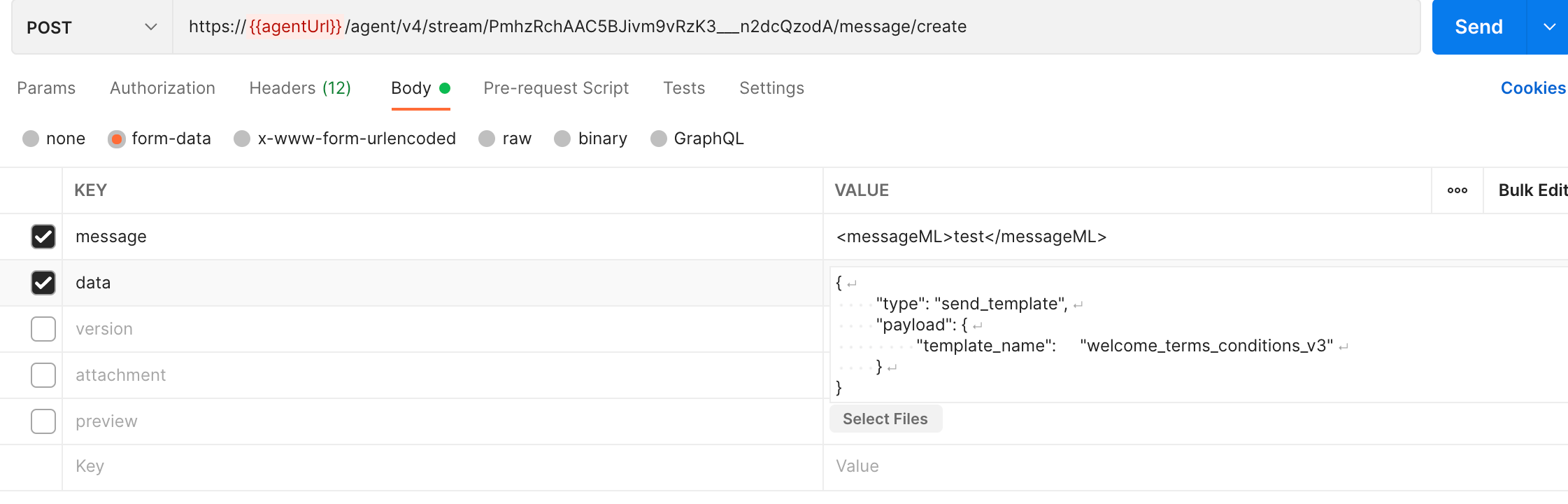
The Agent API (see <https://developers.symphony.com/restapi/reference/create-message-v4>) is used to send a message in an existing stream which accepts messageML and JSON data formats.

**JSON data** sent in a message can be interpreted in the aim to tell the Agent to display an interactive template on WhatsApp through the WhatsApp gateway.

<figure><img src="https://1772193191-files.gitbook.io/~/files/v0/b/gitbook-x-prod.appspot.com/o/spaces%2FyzYyBwz8lpdHwbqafgtF%2Fuploads%2Fgit-blob-29bc637b2fcb0fec27f09686a6bcfb7917a985ad%2FJSON_data.png?alt=media" alt=""><figcaption></figcaption></figure>

### Prerequisites <a href="#format-of-the-json-call-to-the-agent" id="format-of-the-json-call-to-the-agent"></a>

Interactive templates need to be created, then they must be approved by Facebook.

### JSON data format used as an input of the Agent API call for interactive templates <a href="#format-of-the-json-call-to-the-agent" id="format-of-the-json-call-to-the-agent"></a>

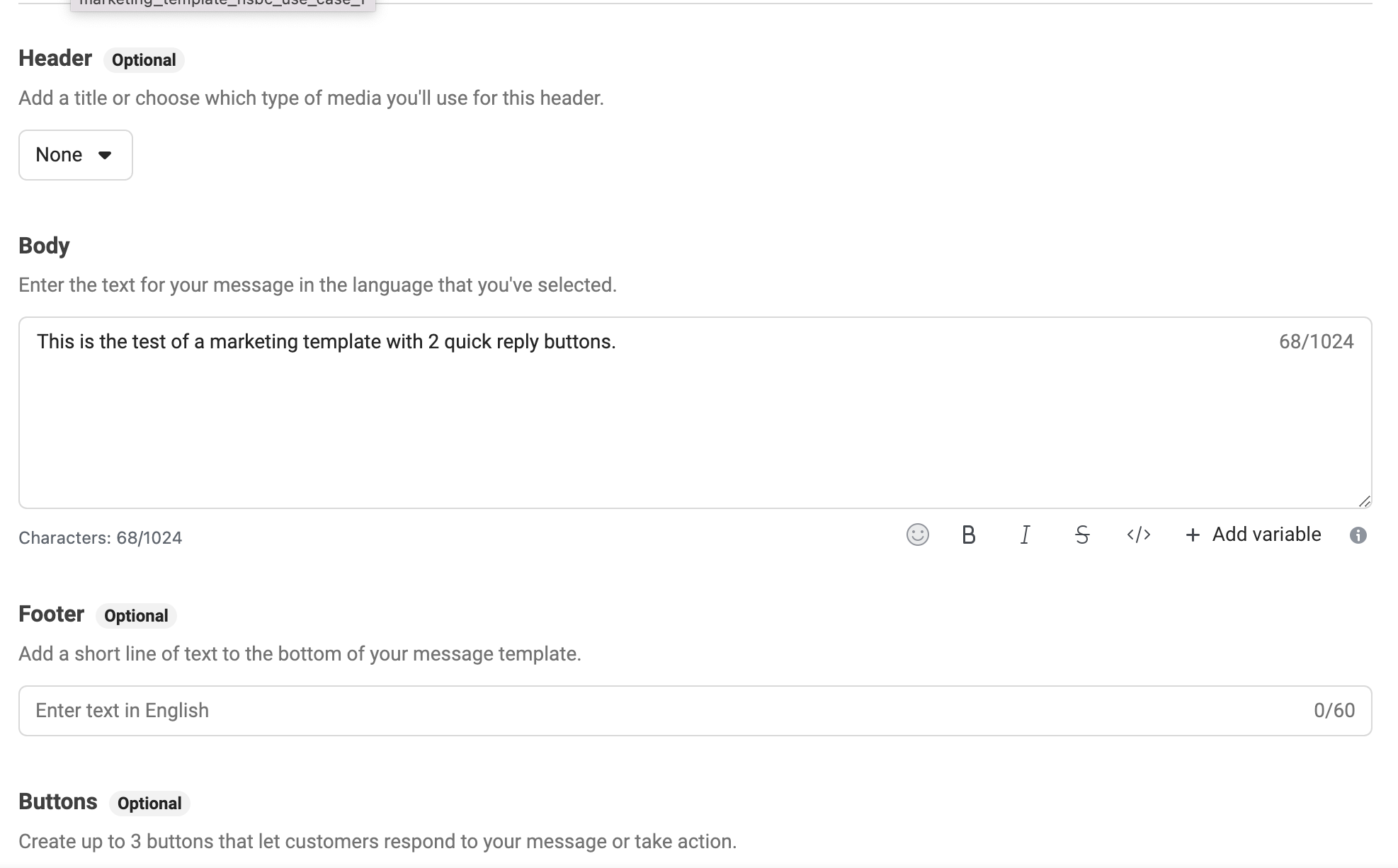
A WhatsApp template payload comprises 6 elements:

* A **template\_name** corresponding to the template name defined in WhatsApp Manager

{% hint style="info" %}
The message template name field is limited to 512 characters, see the *Limitations* section of the [WhatsApp templates guide](https://developers.facebook.com/docs/whatsapp/business-management-api/message-templates/).
{% endhint %}

* A **language (optional)** *<mark style="color:green;">(since release 22.11)</mark>* corresponding to the language to be used to send the template

{% hint style="info" %}
The language can be CHINESE\_CHN, CHINESE\_HKG, CHINESE\_TAI, JAPANESE, etc. as described in the **WhatsApp contact preferred language** API documentation section.

This language will override the user preferred language. If the template does not exist in this language, English language will used instead.
{% endhint %}

* A **header \_\*\*\*\***\_\*\* (optional)\*\* found at the top of the template
* A **body** that comes after the header and contains the content of the template

{% hint style="info" %}
The message template content field is limited to 1024 characters, see the *Limitations* section of the [WhatsApp templates guide](https://developers.facebook.com/docs/whatsapp/business-management-api/message-templates/).
{% endhint %}

* A **footer** **(optional)** that is at the bottom of the template
* Any **button** **(optional)**

These 4 parts correspond to the user interface that is used to define a template in WhatsApp Manager.

<figure><img src="https://1772193191-files.gitbook.io/~/files/v0/b/gitbook-x-prod.appspot.com/o/spaces%2FyzYyBwz8lpdHwbqafgtF%2Fuploads%2Fgit-blob-90faf234b1a83f1938e8f8929e864f2d6e1888d0%2F4%20parts.png?alt=media" alt=""><figcaption></figcaption></figure>

{% hint style="warning" %}
These components can be customized using parameters.
{% endhint %}

#### Format to send to the Agent to display the template

{% code overflow="wrap" %}

```json
{
   "type": "send_template", // call to the send_template action
   "payload": {
      "template_name": "welcome_terms_conditions_v3",// name of the template to call
      "language":"CHINESE_CHN", // language to be used to send the template; this language will override the user preferred language
      "header": {}, // variable to send to the header (only one is accepted)
      "body": [], // variables to send to the body
      "buttons": [] // buttons to display
   }
}
```

{% endcode %}

{% hint style="info" %}
The template name is case-sensitive.
{% endhint %}

We can use the data object above to ask customers to provide all the information we need to send the template:

* Template name
* Parameters in the header (optional)
* Parameters in the body (optional)
* Buttons (optional)

Unlike the body and the header, the footer does not contain any parameters, only static data.

The **type** field allows to define the action targeted by the JSON message. In the ‘**send\_template’** case, the WhatsApp gateway interprets all the information from the payload object, and then sends the related template on WhatsApp.

### Header format

The header property value is a JSON object which contains either the text value of a variable, or a link to a file.

#### Example 1: Text

<figure><img src="https://1772193191-files.gitbook.io/~/files/v0/b/gitbook-x-prod.appspot.com/o/spaces%2FyzYyBwz8lpdHwbqafgtF%2Fuploads%2Fgit-blob-0e8e521f051c862f4f5de0ecf146ac39c95b5812%2FExample%201%20Text.png?alt=media" alt=""><figcaption></figcaption></figure>

{% hint style="info" %}
WhatsApp Manager only supports 1 variable in the header text.
{% endhint %}

```json
"header": {
   "type": "TEXT",
   "text": "<value>" // replaces {{1}} in the screenshot above
}
```

#### Example 2: Redirection parameter

<figure><img src="https://1772193191-files.gitbook.io/~/files/v0/b/gitbook-x-prod.appspot.com/o/spaces%2FyzYyBwz8lpdHwbqafgtF%2Fuploads%2Fgit-blob-49dd4257d9b167869acb5b542e0003477bc93288%2FExample%202%20Redirection%20parameter.png?alt=media" alt=""><figcaption></figcaption></figure>

```json
"header": {
   "type": "REDIRECT",
   "streamId": "<streamId where the link should be redirected>"   
}
```

{% hint style="info" %}
Please note that the redirect variable ( {{1}} ) in the template needs a space before and after for the redirection link to work in the message.
{% endhint %}

In the example above, if the streamId matches the right room, the template will be displayed as below (the wa.me URL is built from the streamId):

` Click on the link to contact your advisor:`` `` `<mark style="color:blue;">`https://wa.me/1XXXXXXXXXX`</mark>

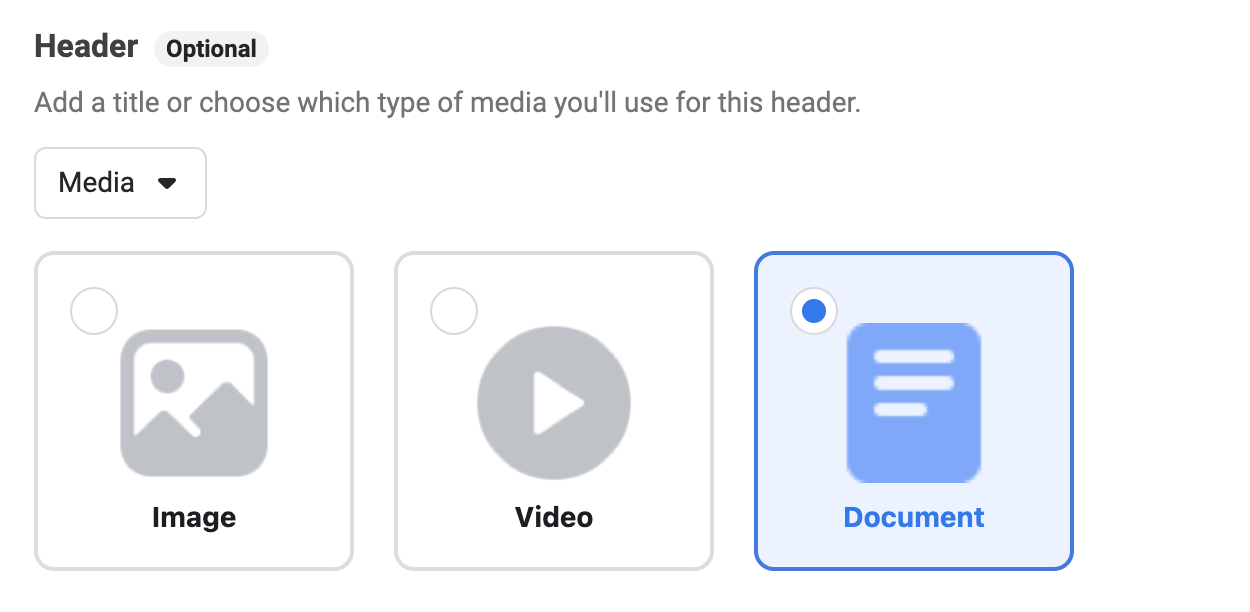
#### Example 3: Send a template with a PDF file in the header

<figure><img src="https://1772193191-files.gitbook.io/~/files/v0/b/gitbook-x-prod.appspot.com/o/spaces%2FyzYyBwz8lpdHwbqafgtF%2Fuploads%2Fgit-blob-ff37733c793ca51ad0ab1326f9549e9cc3593353%2FExample%203%20Template%20with%20PDF%20in%20header.png?alt=media" alt=""><figcaption></figcaption></figure>

```json
"header": {
  "type": "DOCUMENT":
  "link": "<public link to the document>"
}
```

#### Example 4: Send a template with a PDF file in the header (and a file sent in the request body)

```json
"header": {
    "type": "DOCUMENT"
}
```

The document parameters can be one of the following three types: `IMAGE`, `VIDEO` or `DOCUMENT`.

{% hint style="info" %} <mark style="color:green;">**From release 22.11**</mark>, all the types are supported. Before, only the DOCUMENT type was supported.
{% endhint %}

{% hint style="info" %}
The link associated to the document must be publicly accessible.
{% endhint %}

* If the link of the document is present, the template will retrieve it, and then use a related PDF file found as an attachment field of the template message.
* If both a link and an attachment are present (the link of the document in the payload, and the attachment in the request body), the link will be used.
* If no link is present and there are multiple attachments in the request body, the first attachment in the template will be used.

```json
{
  "type": "send_template",
  "payload": {
    "template_name": "template-name-3",
    "header": {
      "type": "DOCUMENT"
    }
  }
}
```

In the example above, the backend checks if the `parameters` object contains the type `DOCUMENT`, and if the `attachment` field is pointing to a file link.

If the corresponding file is correctly retrieved, it will extract the data and the fileName in order to upload it directly on WhatsApp.

{% hint style="info" %}
When performing a file upload operation using a business API, the content type must be set to **application/pdf** in order for the message to be sent.
{% endhint %}

### Body format

The body field is an array that can be either empty or contain a sub-object as JSON object.

Each sub-object represents the text value of a variable declared in the related template.

The order of the sub-objects follows the order of the variables declaration in the template.

The sub-object must have a **type** attribute which supports two possible values: **TEXT** or **REDIRECT:**

* If the sub-object is **TEXT**, an additional attribute named **`text`** must be filled.
* If the sub-object is **REDIRECT**, the additional field named **`text`** is optional, unlike the field **`streamId`** which is mandatory.

#### Example of a body object

```json
"body": [
  {
    // {{1}}
    "type": "TEXT",
    "text": "<value as string variable1>"
  },
  {
    // {{2}}
    "type": "TEXT",
    "text": "<value as string variable2>"
  },
  {
    // you can have a look at the example described on header section
    "type": "REDIRECT",
    "streamId": "<streamId where the link should be redirected>",
    "prefilled_text" : "<prefilled message>" // added since 22.11 optional
    // After clicking on the redirection link, 
    // the prefilled message is ready to be sent by the WhatsApp user. 
    // (the user doesn’t need to type it)
  },
]
```

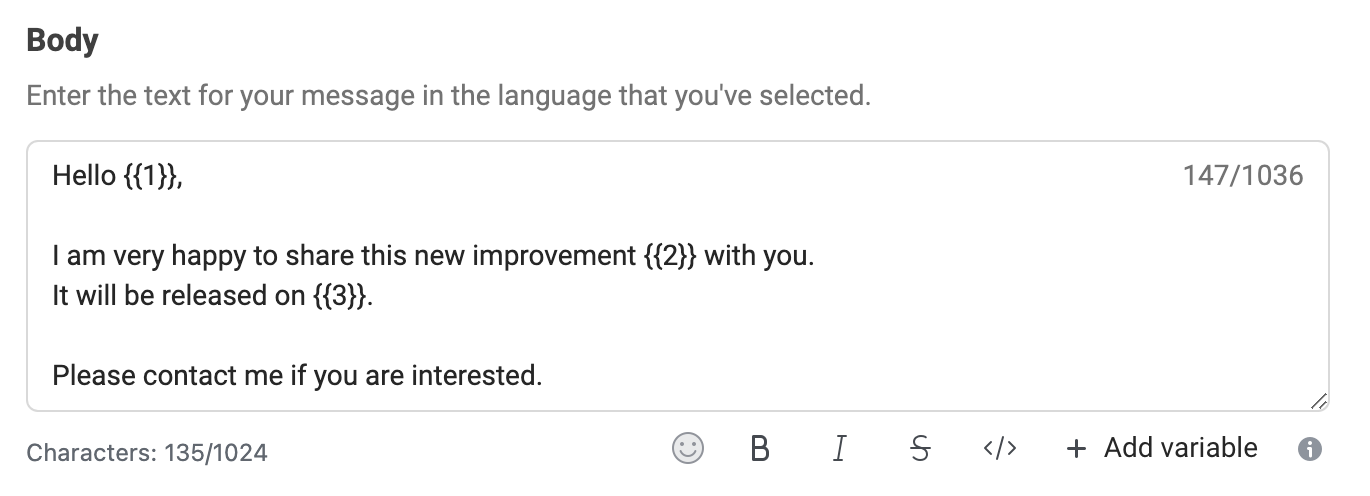
For example, you can have the template below:

<figure><img src="https://1772193191-files.gitbook.io/~/files/v0/b/gitbook-x-prod.appspot.com/o/spaces%2FyzYyBwz8lpdHwbqafgtF%2Fuploads%2Fgit-blob-e65d91998508f7654a755a1e31d24825b88d299b%2Fsample_template.png?alt=media" alt=""><figcaption></figcaption></figure>

With the following JSON data:

```json
"body": [
  {
    // {{1}}
    "type": "TEXT",
    "text": "John"
  },
  {
    // {{2}}
    "type": "TEXT",
    "text": "Interactive templates"
  },
  {
    // {{2}}
    "type": "TEXT",
    "text": "June 22, 2022"
  }
]
```

### Footer format

Nothing needs to be provided in the JSON data, as the footer is static.

### Button format

The **JSON data** should only contain data for buttons using the **dynamic URL type**. For static URLs, the information is already present in the WhatsApp templates.

#### Dynamic URL

<figure><img src="https://1772193191-files.gitbook.io/~/files/v0/b/gitbook-x-prod.appspot.com/o/spaces%2FyzYyBwz8lpdHwbqafgtF%2Fuploads%2Fgit-blob-41a21fb8c1b14e58049e332d0aea18eb415c93f2%2FDynamic%20URL.png?alt=media" alt=""><figcaption></figcaption></figure>

#### Static URL

{% hint style="info" %}
**Static URL** buttons and **QUICK\_REPLY** buttons do not require any parameter.
{% endhint %}

```json
"buttons": [
  {
    "type": "URL",
    "index": 0, // corresponds to the index of the buttons listed in the WhatsApp template
    "path": "<path of the URL>"
  }
]
```

{% hint style="warning" %}
**wa.me** URLs cannot be used in buttons.
{% endhint %}

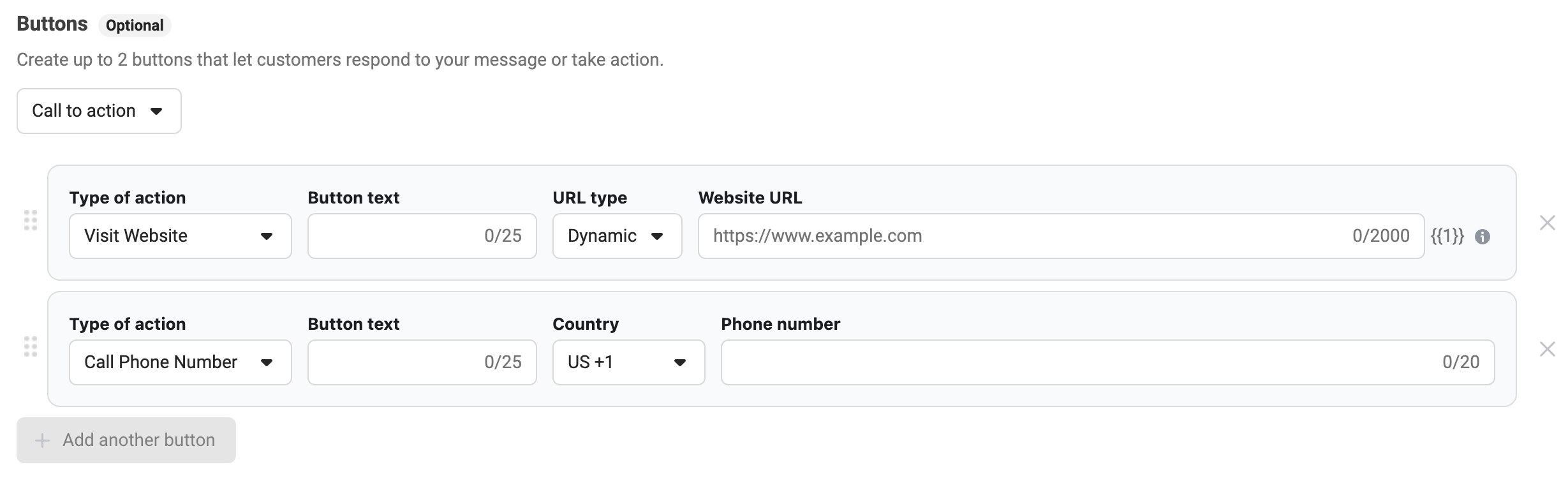
#### **Example 1: Dynamic URL in first place**

<figure><img src="https://1772193191-files.gitbook.io/~/files/v0/b/gitbook-x-prod.appspot.com/o/spaces%2FyzYyBwz8lpdHwbqafgtF%2Fuploads%2Fgit-blob-3bb8650dbd51606160902e135812975052eeda26%2FDynamic%20URL%20in%20first%20place.png?alt=media" alt=""><figcaption></figcaption></figure>

Data needs to be provided for the first dynamic URL button ("index": 0):

```json
"buttons": [
  {
    "type": "URL",
    "index": 0, // corresponds to the index of the buttons listed in the WhatsApp template
    "path": "<path of the URL>" // replace {{1}} in the first button with the dynamic URL
  }
]
```

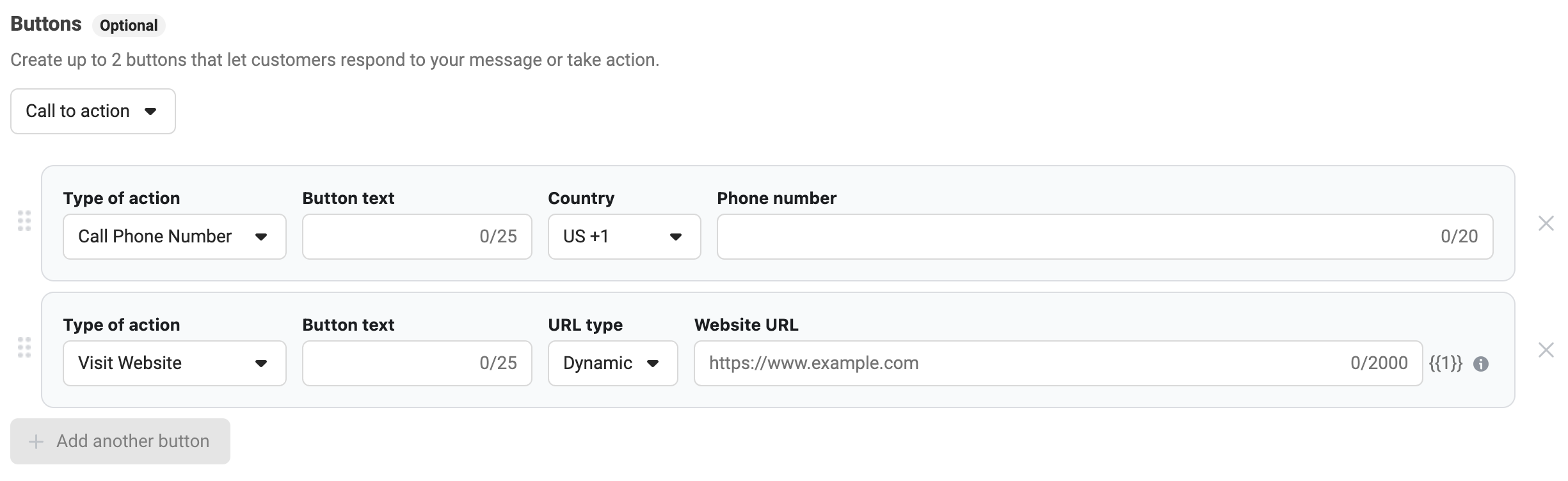
**Example 2: Dynamic URL in second place**

Data needs to be provided for the second dynamic URL button ("index": 1)

<figure><img src="https://1772193191-files.gitbook.io/~/files/v0/b/gitbook-x-prod.appspot.com/o/spaces%2FyzYyBwz8lpdHwbqafgtF%2Fuploads%2Fgit-blob-97bec82ce16ee3d58611b0e53e8f42610cdcc385%2FDynamic%20URL%20in%20second%20place.png?alt=media" alt=""><figcaption></figcaption></figure>

```json
"buttons": [
  {
    "type": "URL",
    "index": 1, // corresponds to the index of the second button
    "path": "<path of the URL>" // replace {{1}} in the second button with the dynamic URL
  }
]
```

{% hint style="info" %}
If the WhatsApp [guidelines for message templates](https://developers.facebook.com/docs/whatsapp/message-templates/guidelines/) are not followed, messages will not be sent.
{% endhint %}